Claude Tier Optimizer
To find out which Claude seats to keep, move to another plan, or take back, run the Claude Tier Optimizer in Flow Engine. Every month, it compares how much each person used Claude with fixed token thresholds and gives you one recommendation per seat. The flow suggests changes only. You make them yourself, in Claude and in License Access Control.
Before you begin
The flow joins data from the SaaS Agent, License Access Control, Reporting, and SAM. If one of them is missing something, the run stops and says what, instead of producing a plan that looks complete but is not. Confirm these prerequisites:
- SaaS Agent: the SaaS Agent is installed and connected to your Claude organization, and collects the claude.ai spend report. Each person's usage comes from that report, Claude Code included. See Claude AI.
- License Access Control: every person who holds a Claude seat has an Include or Reserve user rule for Claude in License Access Control. The rule names the person's plan, Standard or Premium, and is already deployed. Rules that aren't deployed yet are not read.
- Usage history: usage has been collected for at least 14 days. Ideally, it covers the whole period the flow reads, 30 days by default.
- SAM: Software Asset Management has an entitlement record for each Claude plan, with its Vendor Product ID and its Unit Cost. Type the vendor product ID exactly:
team_standardfor Standard andteam_tier_1for Premium. Both plans need a price, even a plan nobody holds yet, because a move to a plan is costed from its price.
Set up the flow
- Open Flow Engine.
- On Flows, select Add Flow.
- Under Or start from a recipe, on the Claude Tier Optimizer card, select Use recipe.
- On the General tab, under When it runs, check the schedule. The recipe runs on the 1st of every month at 08:00 UTC. If your Claude billing cycle starts on another day, change the day, the Time, or the Timezone.
- On the Steps tab, expand Get data. Under Period, set Days: how many days of usage each run reads, from 14 to 90. The default is 30. Leave the rest of the recipe as it is.
- Select Save. Flow Engine deploys the flow and turns its schedule on.
- To get a plan today instead of on the next scheduled date, select the flow's name on Flows, then select Run Now.
- When the run ends, open Suggestions and select the plan. See Read the plan.
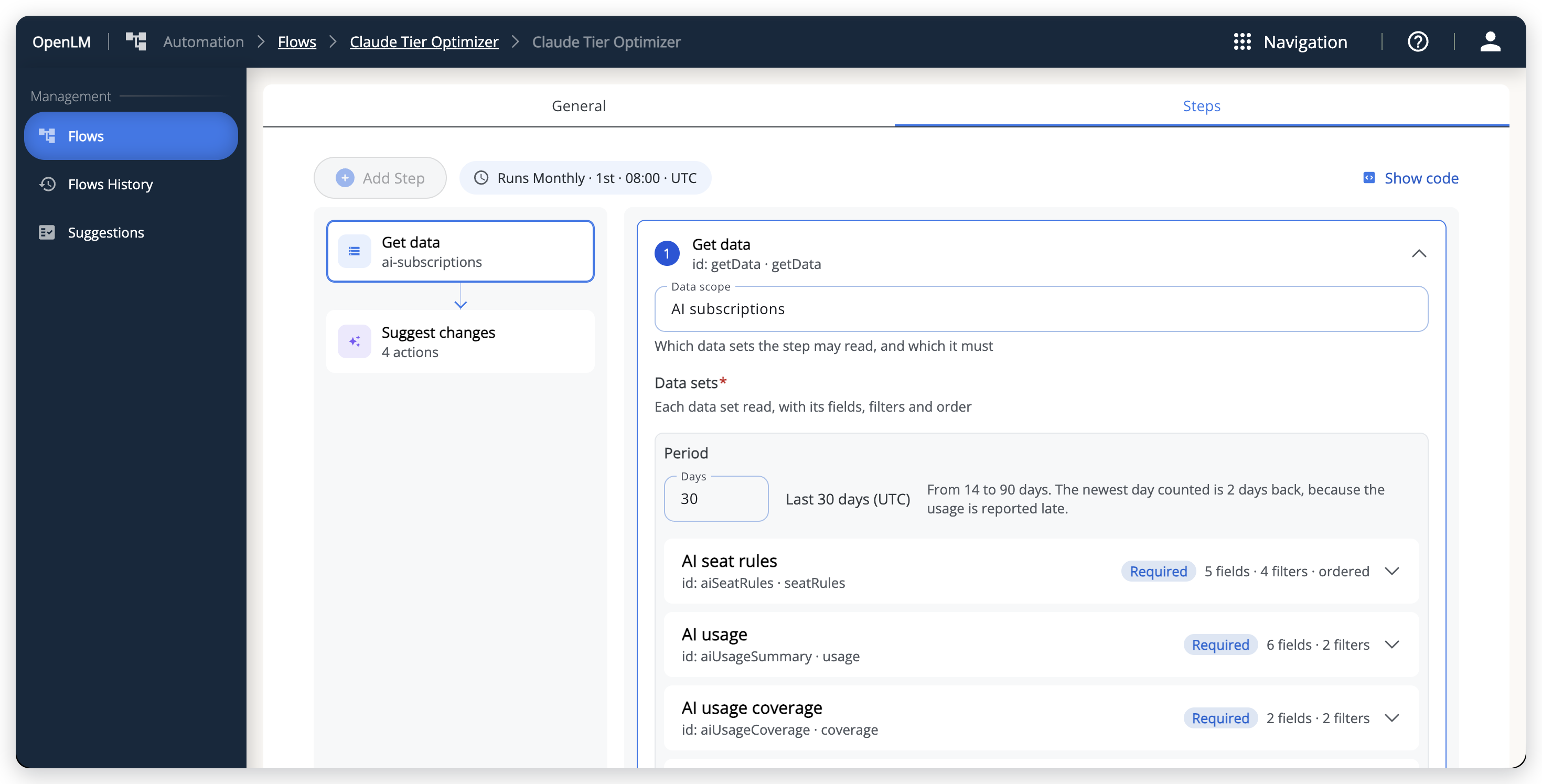 Days is the one setting of the recipe you change
Which days a run reads
Each run reads the most recent days of usage, as many as Days. The newest day it reads is the day before yesterday, because the claude.ai spend report reaches OpenLM Platform two days late. The days are worked out again on every run. With the default 30 days and the monthly schedule, each run reads the 30 days that end two days before it runs.
If usage collection started inside the period, for example because the SaaS Agent was connected two weeks ago, every person is judged over the days that have data. The plan says so in a note.
How each seat is judged
Two numbers decide each seat: the tokens the person used, and the number of days they are judged over. Active days, last activity, and prices are shown for context and never change the decision.
A person judged over fewer than 14 days keeps the seat, whatever the usage, because a few days are too few to judge a plan on.
For everyone else, the thresholds in the following table are stated per 30 days and scaled to the person's days. The plan a person belongs on, compared with the plan they hold today, decides the action:
| Tokens per 30 days | Belongs on | Holds Standard today | Holds Premium today |
|---|---|---|---|
| 7,000,000 or more | Premium | Move to the premium plan | Keep the current plan |
| 1,000,000 to 6,999,999 | Standard | Keep the current plan | Move to the standard plan |
| Under 1,000,000 | No plan | Take the seat back | Take the seat back |
For example, for a person judged over 20 days, the Premium threshold is about 4,666,667 tokens (7,000,000 × 20 ÷ 30) and the Standard threshold is about 666,667 tokens. With 2,100,000 tokens, that person belongs on Standard.
How people and seats are matched
The flow matches the seats in License Access Control with the usage in Reporting as follows:
- Seats and usage are matched by email address, ignoring letter case and spaces around the address.
- A person who holds more than one seat counts as one seat, on the plan recorded last. This happens when two agents scan one Claude organization, for example after a reinstall. If those seats are on different plans, the plan warns you, because the plan recorded last might not be the one the person is on.
- People who used Claude without holding a seat are counted in a note. They get no recommendation.
- Claude Code usage is part of the spend report, so it is never counted twice.
Read the plan
A plan has exactly one recommendation per seat. Each recommendation names the action, the person, and the plans involved, and explains itself with the numbers it was judged on: the tokens, the days, and the threshold they were compared with.
For example, a person on Standard who used 412,380 tokens over 30 days is under the threshold of 1,000,000. The recommendation is Take the seat back, and it shows the price of the Standard seat as money saved.
When you read a plan, keep the following in mind:
- Taking a seat back shows the money it saves, which is the price of the plan given up. Saved, at the top of the plan, adds up those savings.
- Moving a person to the standard plan and taking a seat back carry a caveat: the date a person was added to the team isn't read yet. A person added last week can look like a person who barely used the seat. Check recent joiners before you act.
- The headline, the counts, and the notes come from Flow Engine itself, not from the AI analysis.
Notes on a plan
A plan can carry the following notes:
| Note | What it tells you |
|---|---|
| Usage collected for fewer days | Usage was collected only from a later date, so every person is judged over the days from that date rather than the whole period. |
| People without a seat | How many people used Claude in the period without holding a seat, and how many of them are members of the organization. |
| Seats on different plans | How many people hold seats on more than one plan. Each is judged on the plan recorded last, so the suggestion for them might be wrong. |
| Not every seat read | Not every seat was read from License Access Control, so the plan doesn't cover every seat. |
| No recommendation came back | The people the analysis returned nothing for, by name, so nobody drops out of the plan without a word. |
| Caveats | The caveat of each action the plan proposes, once. |
Why a run stopped
If the data can't be judged, the run stops with a reason instead of a plan. No usage would read as nobody using Claude, and a missing price would cost every recommendation wrongly. A stopped run shows Failed on Flows History. Hover over Failed to read the reason, then fix the cause as the following table shows:
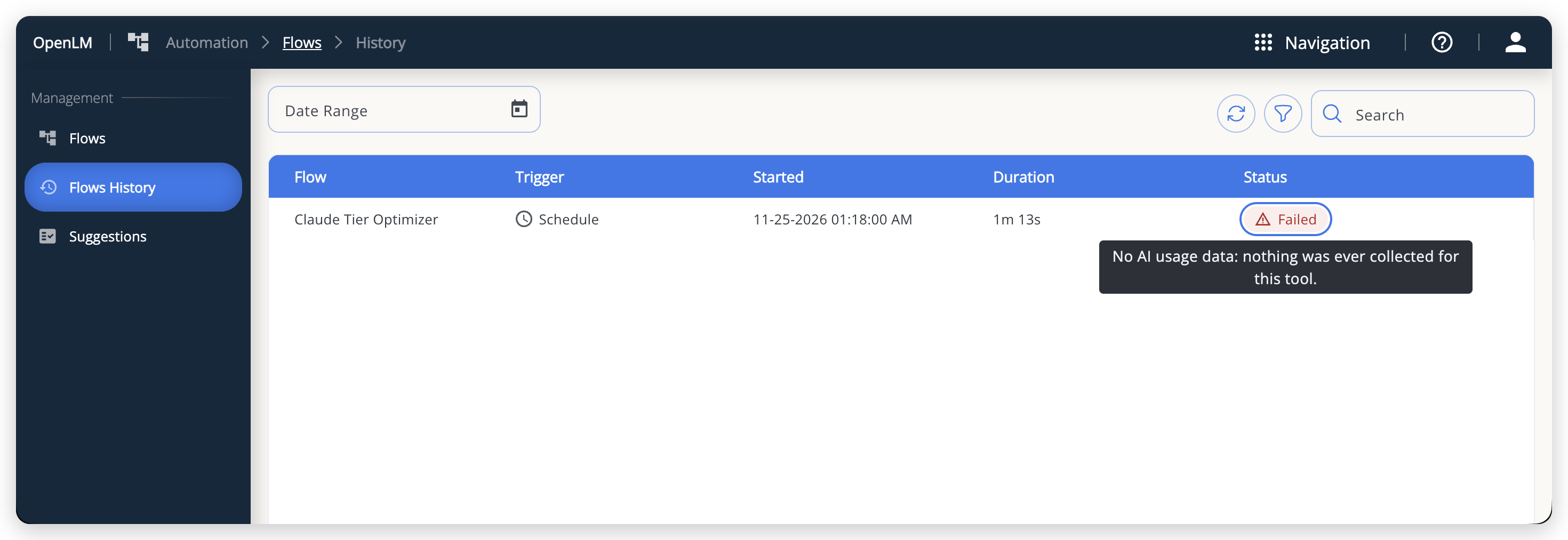 The reason a run stopped shows when you hover over its status
| Reason | What to do |
|---|---|
| "No AI usage data: nothing was ever collected for this tool." | Check that the SaaS Agent is connected to your Claude organization and collects the spend report. |
| "No AI usage data in the period from … to …: the data covers … to …." | Collection stopped, or started after the period. Check the SaaS Agent, or wait for new data. |
| "No seats in License Access Control: no member of the organization holds a plan." | Check that the Claude user rules exist and are deployed. |
| "The seat of the person: … names no plan in License Access Control." | Set the plan on that person's rule. |
| "Set prices in SAM for …" | Add an entitlement record in SAM for each plan the reason lists, with its exact vendor product ID and a unit cost. |
| "The plans: … are held in License Access Control and are not in the price filter of the flow." | One or more Claude rules name a plan other than Standard (team_standard) or Premium (team_tier_1). Check the plan on those rules. |
For reasons that come from any flow, such as a service that couldn't be reached, see Check past runs.
How plan prices are chosen
Each plan's price is the unit cost of its newest active entitlement record in SAM, in USD at the exchange rate of the record's purchase date. The flow chooses the record as follows:
- A record with no expiry status counts as active. A record marked expired is skipped.
- When a plan has several active records, the one added to SAM last decides the price.
- If that record has no cost, for example because no exchange rate was found for its purchase date, the run stops with "Set prices in SAM for …". The flow doesn't fall back to an older price you no longer pay.
The documentation team might draft this page using a large language model. A technical writer reviews every page and verifies it against the product before publishing it. A human makes the final decision.