Squish
Follow these steps to monitor Squish floating licenses in OpenLM Platform. The Squish license server, which serves the tester and execution licenses of Squish GUI Tester, has a REST API for monitoring. OpenLM Broker reads license counts and connected clients from that API on a schedule and reports them to OpenLM Platform. The REST API is off by default, so you turn it on in the license server's settings file first.
Before you begin
Confirm these prerequisites:
- OpenLM Platform.
- OpenLM Broker v26.3.2.1352 or higher, installed on a machine that reaches the Squish license server over HTTP. Earlier Broker versions do not list Squish as a license manager type.
- The Broker approved in Broker Hub. OpenLM Platform accepts license manager data only from approved Brokers, so the Squish entry does not reach Pending Servers until the Broker itself is approved.
- Administrator access to the machine that runs the Squish license server, so you can edit its settings file and restart it.
What you can monitor
OpenLM Broker monitors the following for Squish:
| LM Type in the Broker | Commands | Logs | Quantity | Expiration date | Denied | Borrowing | Allocations | Report resolution |
|---|---|---|---|---|---|---|---|---|
| Squish | Yes (REST API) | No | Yes | No | No | No | No | Seconds |
On every data inquiry, the Broker reports the following:
- Feature name:
testerandexecution, the two license types that the Squish license server serves. - Total: the maximum number of licenses of that type that the license server can grant.
- In use: the number of licenses of that type that the license server has granted. If the license server lists more connected clients of that type than it counts as granted, Broker reports the number of clients.
- Workstation: the IP address of each connected client, as the license server reports it. IPv4 addresses often arrive in IPv6 form, for example
::ffff:10.1.20.45. - Username:
GeneralUserfor every session. The Squish license server reports which machine holds a license, not which user, so OpenLM Platform cannot show usernames for Squish. - License type: Broker reports both features as Floating.
- Vendor: Broker reports
Qtunless you add a different vendor on the Vendors tab.
Session start times, license expiration dates, license denials, borrowed licenses, and license allocations are not available for Squish.
How OpenLM Broker interfaces with Squish
When you configure a Squish port, the Broker fills in only the settings in this list. The remaining license manager settings stay empty:
-
Commands:
data_inquiryonly, which the Broker UI shows as Data Inquiry. Its default command line is the base address of the REST API, not a program:http://{$host}:{$port}In the Broker UI, the command line already shows the Host from the License Managers page and the port of the license manager in place of
{$host}and{$port}. On every run, Broker adds two paths to this address and sends an HTTPGETrequest to each:/v1/statistics, for the total and in-use count of tester and execution licenses./v1/clients, for the connected clients and the license type each one holds.
The requests carry no access token. Squish has no status command, so Broker reports the license server as active whenever both requests succeed.
-
License file: None. Broker does not read the Squish license file (
.cfg). -
Log file: None. The Log Files tab stays empty.
-
Polling: The data inquiry runs every 55 seconds by default. Sessions that start and end between two runs do not reach OpenLM Platform.
Turn on the Squish REST API
The REST API listens on its own port, separate from the port that Squish clients use to request licenses (often 49345). Broker needs the REST API port.
-
On the license server machine, open the licenses folder:
- Windows:
C:\ProgramData\Squish License Server\licenses\ - Linux and macOS:
/etc/squish-license-server/licenses/
- Windows:
-
Open the settings file of the license you want to monitor in a text editor.
The settings file has the name of the license file, with
.settings.iniin place of.cfg. For example, the settings forsquish.cfgare insquish.settings.ini. -
In the
[REST]section, setListenPortto a free TCP port, for example47001:[REST]AnonymousReadAccess=trueListenAddress=ListenPort=47001ReadAccessTokens=- Keep
AnonymousReadAccess=true. Broker cannot send an access token, so it cannot read the API when the license server requires one. - Leave
ListenAddressempty to listen on all network interfaces, or set it to an address that the Broker machine can reach. If you set it to127.0.0.1, only a Broker on the license server machine itself can connect.
- Keep
-
Restart the Squish license server.
The license server reads the settings file only when it starts. The license server log then shows a line similar to
Serving REST API on [0.0.0.0]:47001. -
From the Broker machine, open
http://<license-server>:47001/v1/statisticsin a browser.The license server answers with JSON that lists
activeLicensesforexecutionandtester. If the page does not open, allow the port through the firewall between the Broker machine and the license server.
Configure OpenLM Broker
To add Squish to the Broker, follow these steps:
-
Open the Broker UI for the Broker that monitors Squish.
On the Broker machine itself, open
http://localhost:5090/. Local access needs no credentials. From any other machine, open Broker Hub in OpenLM Platform and select the Broker UI icon of that Broker, which opens the interface with the remote access token handled for you. -
On the License Managers page, check Host.
OpenLM lists the license server under this host name, and the field holds the host for every license manager on the page, not for Squish alone.
- If the field is empty, enter the Squish license server's host name and select the save icon next to the field.
- If it names a different machine, leave it as it is, and enter the address of the license server in the data inquiry in step 6 instead.
-
Select License Managers, then Add License Manager.
-
From LM Type, select Squish.
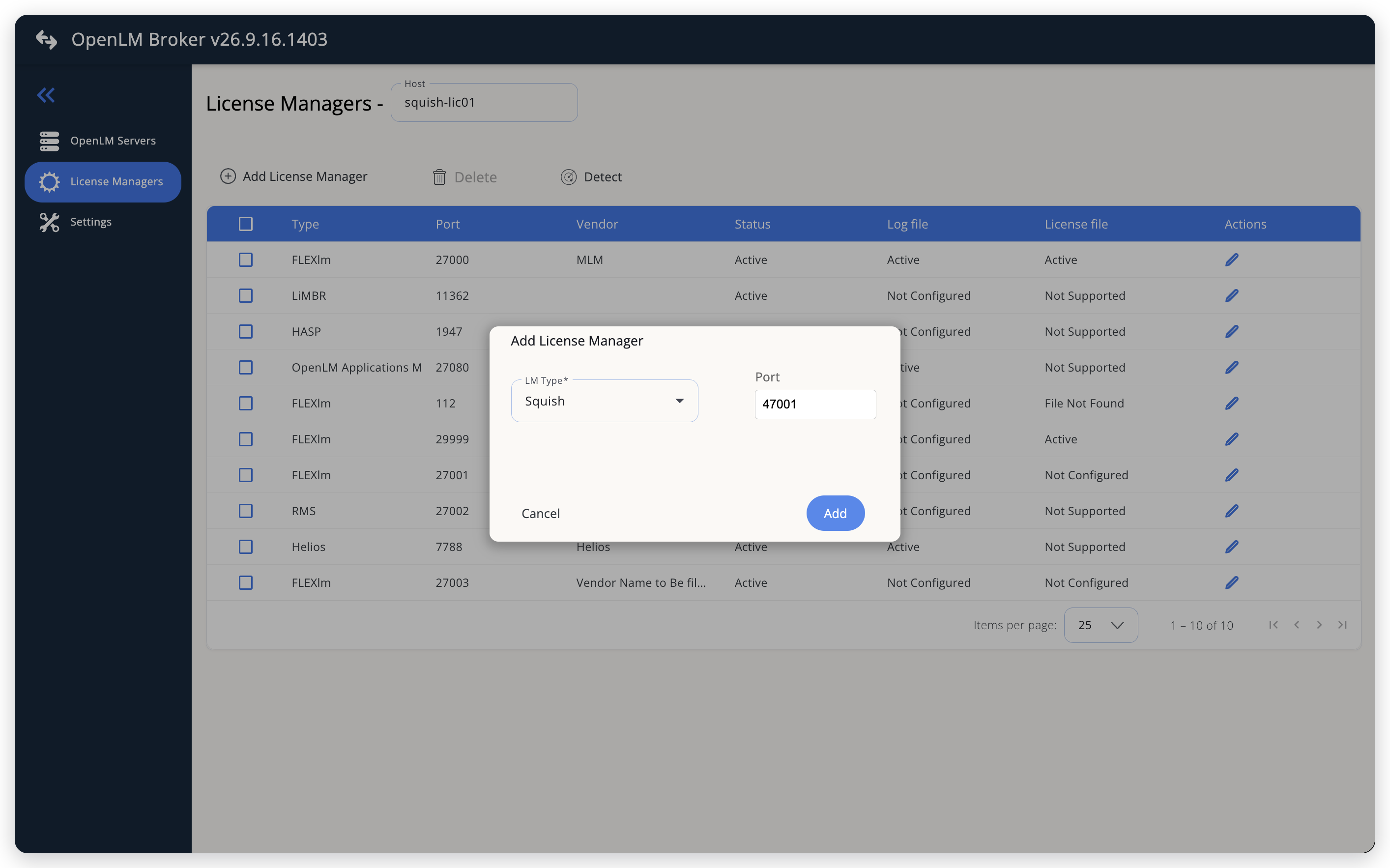 Add Squish as a license manager
-
Enter the REST API port that you set as
ListenPort, for example47001, and select Add.Do not enter the port that Squish clients use for licenses, such as
49345. The license port does not answer HTTP requests, and the data inquiry fails with afailed to responderror. -
On the Commands tab, select the Data Inquiry command, and check its command line in the large text box.
- Host set to the license server in step 2: keep the default command line.
- License server on another host: replace
{$host}:{$port}with the license server's host name and REST API port, for examplehttp://squish-lic01:47001.
Do not add a path or a closing
/to the address. Broker adds/v1/statisticsand/v1/clientsitself.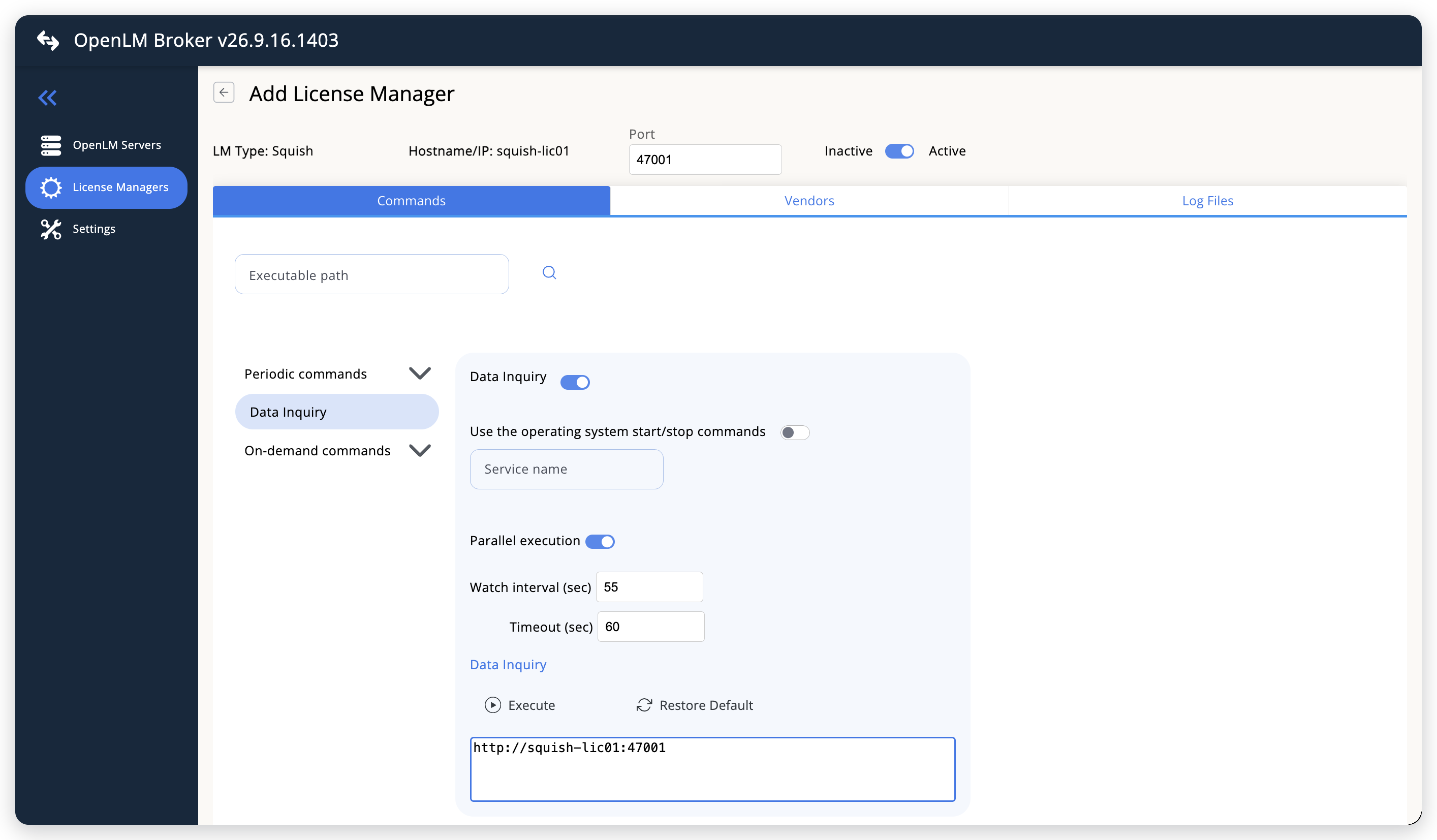 The default Data Inquiry, with Host and the REST API port filled in
-
Leave Watch interval (sec) at 55 seconds, or set the polling interval you want. Timeout (sec), 60 seconds by default, limits how long Broker waits for the license server to answer.
-
Leave the Vendors and Log Files tabs empty. Add a vendor only if you want OpenLM to show a vendor name other than
Qt. -
Select Save.
-
Reopen the Squish license manager from the License Managers list, go to the Commands tab, and select Execute to test the data inquiry.
A successful test returns the license server XML, with a
testerand anexecutionfeature and a user entry for each connected client. Broker refuses Execute on a license manager that you have never saved, and answersNeed to save first in order to execute command. -
Wait for the next periodic data inquiry.
Execute only tests the command inside the Broker UI and sends nothing to OpenLM Platform. Broker reports Squish to OpenLM Platform on the periodic data inquiry, so the license server reaches Pending Servers about a minute after you save.
Approve Squish in OpenLM Platform
To approve the Squish license server, find its row in Pending Servers. Broker reports Squish with the OpenLM Generic protocol and names the license server after the Host you set in the Broker UI, so the pending entry is listed by that host name and the port you entered, with License Manager Type set to Squish.
-
Sign in to OpenLM Platform.
-
Select Navigation (the grid icon in the OpenLM Platform header), then Licenses and Features, then License Servers.
-
Under Management, select Pending Servers.
-
Find the row whose Host Name and Port match the license manager you configured in Broker.
Its License Manager Type is Squish, and Source names the Broker.
-
Select that row, then select Approve and merge.
Verify the integration
To confirm that OpenLM Platform receives Squish data:
-
In OpenLM Platform, open License Servers and, under Operational, select Live Servers Statistics.
-
Find the row for the host and port you configured, and confirm that Status is Up.
Confirm that RSQT (Recent Successful Query Time), the last time OpenLM read licenses and usage from the server, is recent, and that Quantity and Used carry numbers.
-
Select Navigation, then Licenses and Features, then Licenses, and select Live Statistics.
The
testerandexecutionfeatures appear as their own rows, with License Type Floating and the Total and Used counts from the license server. Compare them withactiveLicensesathttp://<license-server>:<port>/v1/statistics, wheremaxis the total andcurrentis the number in use. -
Select a feature's Used count to confirm that sessions arrived.
The count opens the Usage app on Currently Consumed Licenses, where each connected client appears with Username
GeneralUserand the client's IP address as Workstation.
The status can take up to 3 minutes to update for a new connection.
Troubleshooting
If Squish never reaches Pending Servers, open Broker Hub and confirm that this Broker appears under Brokers with status Up, and not under Pending Brokers. OpenLM Platform accepts license manager data only from approved Brokers.
If the Broker is approved and up, or if Squish appears with no features, go back to the Commands tab in the Broker UI and select Execute. Compare the result with this list:
- An error that contains
failed to respond, followed byPlease configure ListenPort field under REST section in the license settings file.: Broker reached a port that is not the REST API, usually the license port that Squish clients use. From v26.4.30.958, Broker adds thePlease configuretext. Turn on the REST API as described in Turn on the Squish REST API, then set the license manager's port, and the port in the data inquiry, to theListenPortvalue. Earlier Broker versions show only thefailed to respondpart. Connection refused, or a timeout: nothing answers on that host and port. Confirm thatListenPortis set, that the license server was restarted after the change, thatListenAddressis not127.0.0.1when Broker runs on another machine, and that a firewall does not block the port. Openhttp://<license-server>:<port>/v1/statisticsin a browser on the Broker machine to test the route.- An error that holds only a request address, such as
http://squish-lic01:47001/v1/statistics?0.4183, with no other text: the license server answered, but with an HTTP error instead of license data. Open the same address in a browser on the Broker machine, without the?and the number, to see the error:401 Unauthorized: the license server requires an access token. SetAnonymousReadAccess=truein the[REST]section and restart the license server.404 Not Found: the command line has a path after the port. Remove it, so the command line ends with the port, for examplehttp://squish-lic01:47001.
- A server line with no features and no
server_status, such as<SERVER name="squish-lic01" port="47001" request_time_utc="…"/>: Broker read the license server, but either the tester or the execution licenses have no connected clients. See Known limitations.
The Broker log holds the detail, in the logs folder of the Broker installation. A manual Execute writes to broker-service.log, and the periodic data inquiry writes to port-<port>-Squish.log.
Known limitations
These limits apply to Squish monitoring:
- Broker reports no Squish data at all while either the tester or the execution licenses have no connected clients, for example outside working hours or at a site that uses only tester licenses. The license server then appears in OpenLM with no features until both license types have at least one connected client.
- The Squish license server does not report usernames, so every session appears as
GeneralUser, identified only by the client's IP address. - Broker does not report session start times, license expiration dates, license denials, borrowed licenses, or license allocations, and does not upload usage history. Usage in OpenLM starts when you configure the license manager.
- Broker reads the current state of the license server, not a log, so it sees only the sessions that are open when the data inquiry runs. Broker can miss a session shorter than the watch interval.
- Broker cannot authenticate to the REST API, so the license server must allow anonymous read access.
- Each license file served by the license server has its own settings file and REST API port. To monitor more than 1 license, turn on the REST API for each one and add a Squish license manager for each port.
- Multiple server redundancy is not available for Squish.
The documentation team might draft this page using a large language model. A technical writer reviews every page and verifies it against the product before publishing it. A human makes the final decision.