Dongle monitoring
To see where hardware dongles are, who uses them, and which are blacklisted, open the Dongle monitoring report. It tracks hardware dongles used for license enforcement, in real time and historically. It shows dongle distribution across hosts, how long users keep them active, and which users and manufacturers participate, and it flags blacklisted or duplicate devices for security and compliance monitoring.
The following screenshot shows the charts and counts of dongle activity:
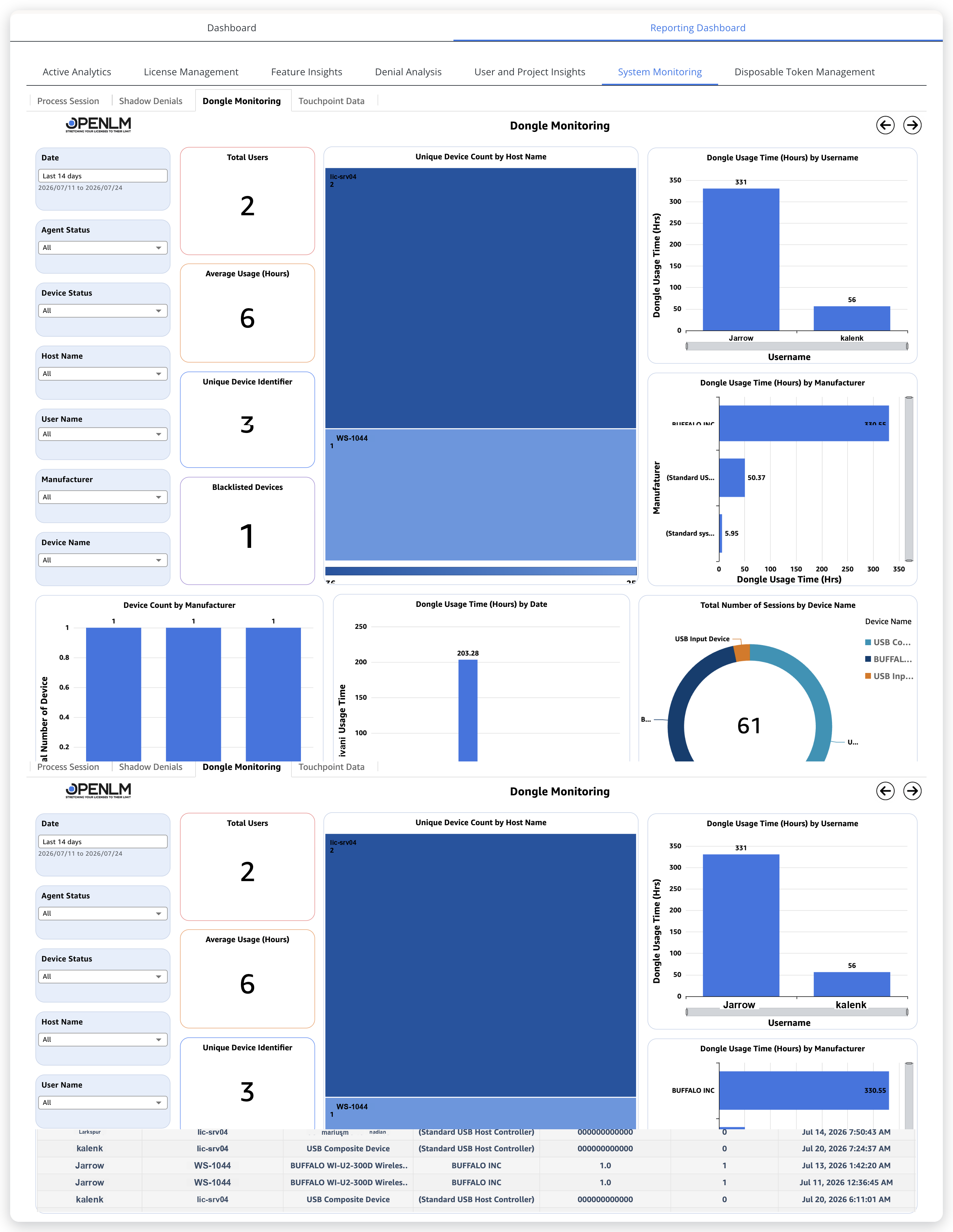 The Dongle monitoring report shows dongle usage, hardware distribution, and security compliance.
Visualizations
The report has the following visualizations:
- Device Count by Host Name: Use this treemap to track distribution across systems. It shows the number of dongles connected to each host machine. Values displayed:
- Host Name
- Device Count
- Dongle Usage Time by Username: Use this bar chart to find the top consumers of dongle-based licenses. It shows how much time each user has used dongles. Values displayed:
- Username
- Dongle Usage Time
- Dongle Usage Time by Manufacturer: Use this bar chart to identify vendor-specific patterns. It shows total dongle usage time by device manufacturer. Values displayed:
- Manufacturer
- Dongle Usage Time
- Device Count by Manufacturer: Use this bar chart to monitor hardware inventory. It shows the number of dongles per manufacturer. Values displayed:
- Manufacturer
- Device Count
- Dongle Usage Time by Date: Use this bar chart to identify usage trends over the selected period. It shows daily dongle usage times. Values displayed:
- Day
- Dongle Usage Time
- Total Number of Sessions by Device Name: Use this donut chart to see device-level activity. It shows the number of sessions by dongle device name. Values displayed:
- Total Number of Sessions
- Device Name
The report also has the following counts:
- Total Users: Count of users who use dongles.
- Average Usage (Hours): Average dongle usage duration per user.
- Unique Device Identifier: Number of unique dongle devices detected.
- Blacklisted Devices: Number of blacklisted dongles identified for security monitoring.
To narrow the report, use these filters:
- Device Connected Date: A relative date filter. It defaults to Last 14 days and prints the resolved range underneath (for example,
2026/07/11 to 2026/07/24). Select another preset, or a custom start and end date, to change the reporting period. - Agent Status: Filter by the agent operational status, such as Online or Offline.
- Device Status: Filter devices by status, for example Active or Blacklisted.
- Host Name: Select specific host names to view dongle usage by machine.
- User Name: Filter by specific usernames to analyze individual usage behavior.
- Manufacturer: Select dongle manufacturers to focus on vendor-specific devices.
- Device Name: Filter by dongle device names to view sessions or usage of specific hardware.
Interpreting this report
Use these points to read the report:
- This is a hardware asset register with a usage meter. Unique Device Identifier counts the dongles OpenLM Platform has seen. Hosts holding several dongles, and dongles that never accumulate usage time, are redistribution candidates. A dongle plugged in but unused is the hardware version of unused licenses.
- Blacklisted Devices greater than zero is a security follow-up, not a statistic. The details table gives host, user, and last-seen time for each flagged device.
- Usage time by manufacturer separates ecosystems. If one vendor's dongles concentrate the hours while another's sit idle, the idle ones are the inventory to challenge at renewal.
- Coverage caveat: only machines running the monitoring agent report dongles. An empty host list can mean no dongles or no agent, and Agent Status shows which.
The documentation team might draft this page using a large language model. A technical writer reviews every page and verifies it against the product before publishing it. A human makes the final decision.