Process Session
The Process Session Report provides detailed insights into application usage sessions by tracking process run times, idle times, and session durations across hosts, users, and process names. This helps identify resource utilization, idle license consumption, and system usage patterns to support optimization.
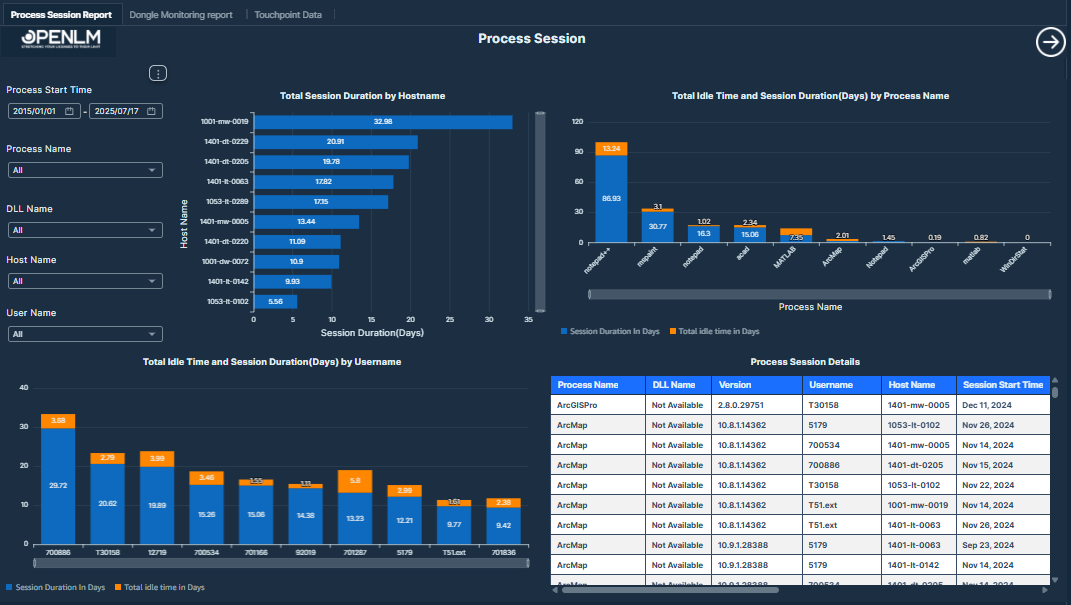 Process Session
This report visualizes process-level license session durations, idle times, and user-machine activity for detailed process usage monitoring.
Visualizations
- Total Session Duration by Host name: Bar chart showing the total accumulated session duration in days for each host name, helping identify which machines have the longest running processes.
Values displayed:
-
Host Name
-
Session Duration in Days
-
Total Idle Time and Session Duration by Process Name: Dual-axis chart (bar and line) displaying total session duration versus idle time for each process name. This highlights efficiency or waste in application usage.
Values displayed:
-
Process Name
-
Session Duration in Days
-
Idle Time in Days
-
Total Idle Time and Session Duration by Username: Area and line chart comparing session durations and idle times across different users. This helps detect idle usage trends at the user level.
Values displayed:
-
Username
-
Session Duration in Days
-
Idle Time in Days
-
Process Session Details Table: A detailed table showing each process session's metadata including process name, dynamic link library (DLL) file, version, agent status, and start/end times.
Values displayed:
-
Process Name: Name of the running application or process.
-
DLL Name: Dynamic link library (DLL) file used by the process.
-
Version: Software version of the process.
-
Agent Status: Indicates if the monitoring agent is online or offline.
-
Session Start Time: Start time of the process session.
-
Session End Time: End time of the process session.
-
Session Duration in Minutes: The duration between session start and end times (minutes).
-
Shutdown Reason: The reason behind the shutdown of the process session.
-
Total Idle Time (Minutes): Idle duration in minutes for the session.
-
Username
-
Host Name
-
Filters:
-
Process Start Time: Users can filter by date range from January 1, 2015 to July 17, 2025.
-
Process Name: Users can select specific process names to focus the report.
-
DLL Name: Users can filter by dynamic link library (DLL) file name associated with the process.
-
Host Name: Users can select specific host machines.
-
Username: Users can filter by username to view individual usage sessions.