Touch-Point Events
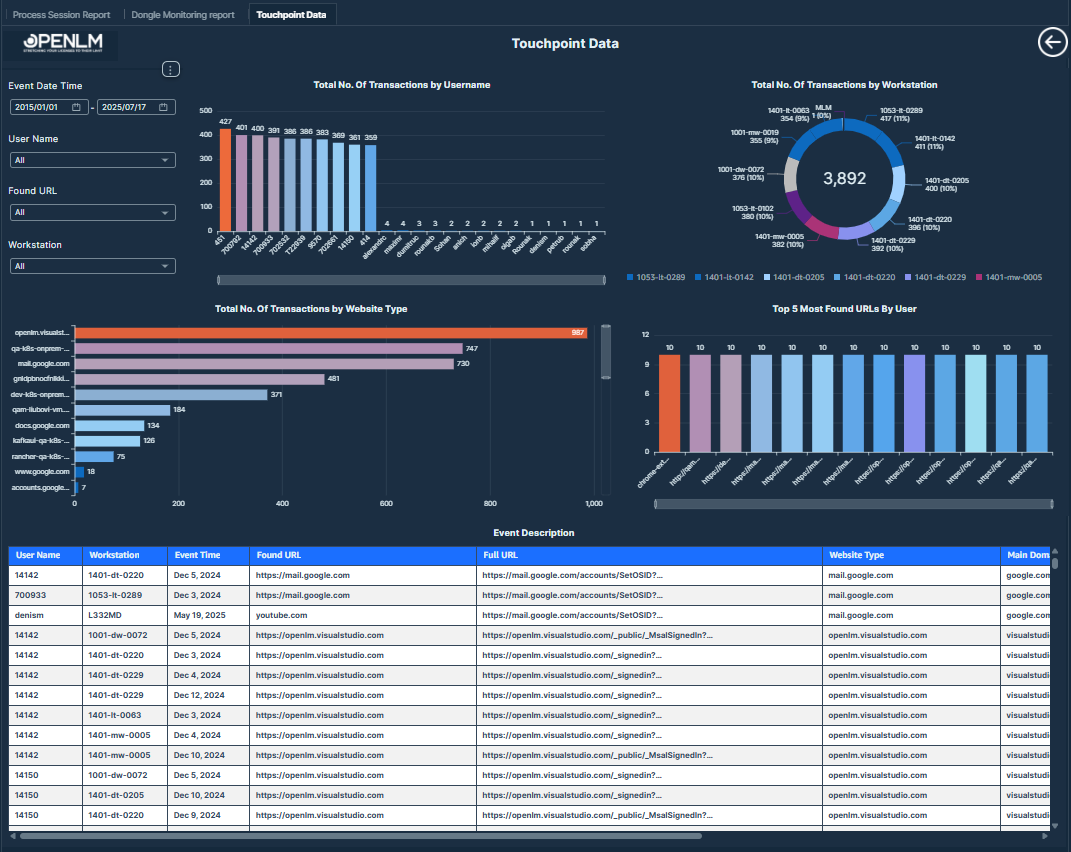
The Touchpoint Data Report provides detailed insights into user interactions with web domains and URLs through monitored browsers across various workstations. It tracks the number of transactions per user, workstation, and website type to support security monitoring, productivity analysis, and usage trend reporting.
 Touch-Point Events
A comprehensive report visualizing user web interactions, workstation activity, and frequently accessed URLs for browser-based monitoring.
Visualizations
- Total Number of Transactions by Username Bar Chart: Shows the count of web interactions performed by each user.
Values displayed:
-
Username
-
Total Number of Transactions
-
Total Number of Transactions by Workstation Donut Chart: Displays the distribution of transactions across different machines, helping identify workstation-level activity patterns.
Values displayed:
-
Workstations
-
Total Number of Transactions
-
Total Number of Transactions by Website Type Bar Chart: Highlights the domains and website types visited, including work-related and nonwork sites.
Values displayed:
-
Website Type
-
Total Number of Transactions
-
Top 5 Most Found URLs Bar Chart: Lists the most frequently detected URLs in monitored browser sessions.
Values displayed:
-
URL
-
Total Number of Transactions
-
Touchpoint Details Table: A detailed breakdown of transactions including website type, main domain, subdomain, event description, page title, and event source.
Values displayed:
-
Website Type: The type of website visited.
-
Main Domain: The primary domain extracted from the URL.
-
Sub Domain: The subdomain part of the URL
-
Event Description: The type of event recorded (for example, browser session).
-
Page Title: Title of the web page at the time of the interaction.
-
Event Source: The full URL or web address from which the event originated.
-
Filters:
-
Event Date Time: Users can select any date range between 2015/01/01 to 2025/07/17 to filter touchpoint events.
-
Username: Users can select specific usernames to narrow the data to particular individuals.
-
Found URL: Users can filter by specific URLs or URL patterns to focus on particular web interactions.
-
Workstation: Users can select specific workstation names to analyze activity by device.