役割と権限
範囲
本ドキュメントは OpenLM の Roles & Permissions Groups 機能を説明し、OpenLM が管理するライセンス制御システムに対して詳細なグルーピングと権限付与を行いたいシステム管理者向けのリファレンスです。
概要
OpenLM SLM はロールベースのセキュリティ機能を備えており、管理者はアクセスロールを設定することで OpenLM ツールへのアクセスをカスタマイズできます。この機能により、ヘルプデスク、システム管理者、マネージャー、開発者など多様なグループに応じた OpenLM ツールの適用が可能になります。ロールベースのセキュリティシステムは、登録サーバー、フィールド、アクションボタンなど、OpenLM システムのほぼすべてのリソースを保護します。
Identity Service
OpenLM Identity Service は、ライセンス監視・管理ソリューションにおける多層の ID およびアクセス管理機能です。 ライセンスファイルに Role&Permission 機能が含まれていない場合でも、Identity Service にはユーザーに割り当てるための基本ロールがあり、編集のみ可能です(追加、削除、複製は不可)。
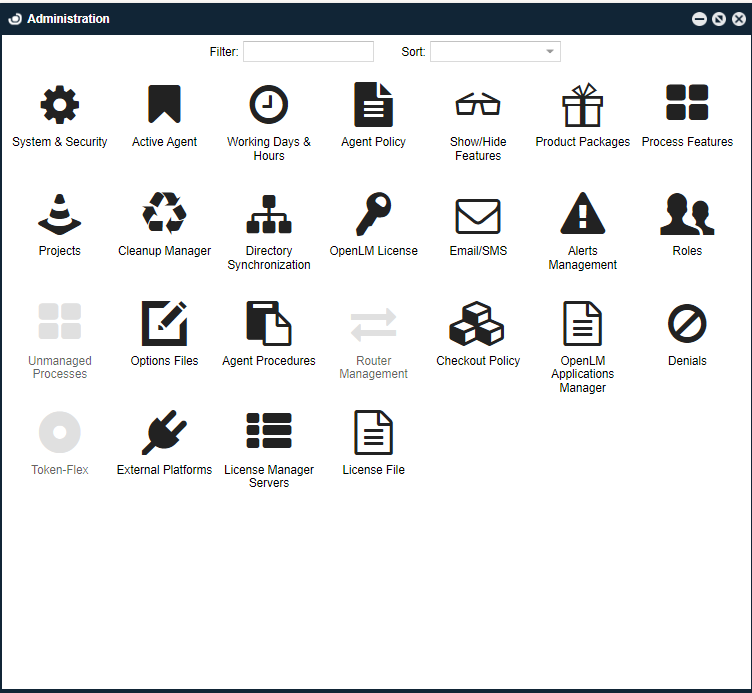

ただし、ライセンスファイルに Role&Permission が含まれている場合、以下のようなロールの全機能を利用できます。

詳細な機能については、sales@openlm.com の営業までお問い合わせください。 Identity Service の最初の既定アカウントは Admin です。新しいユーザーを作成する場合は、次の手順に従います。
新規ユーザーの作成
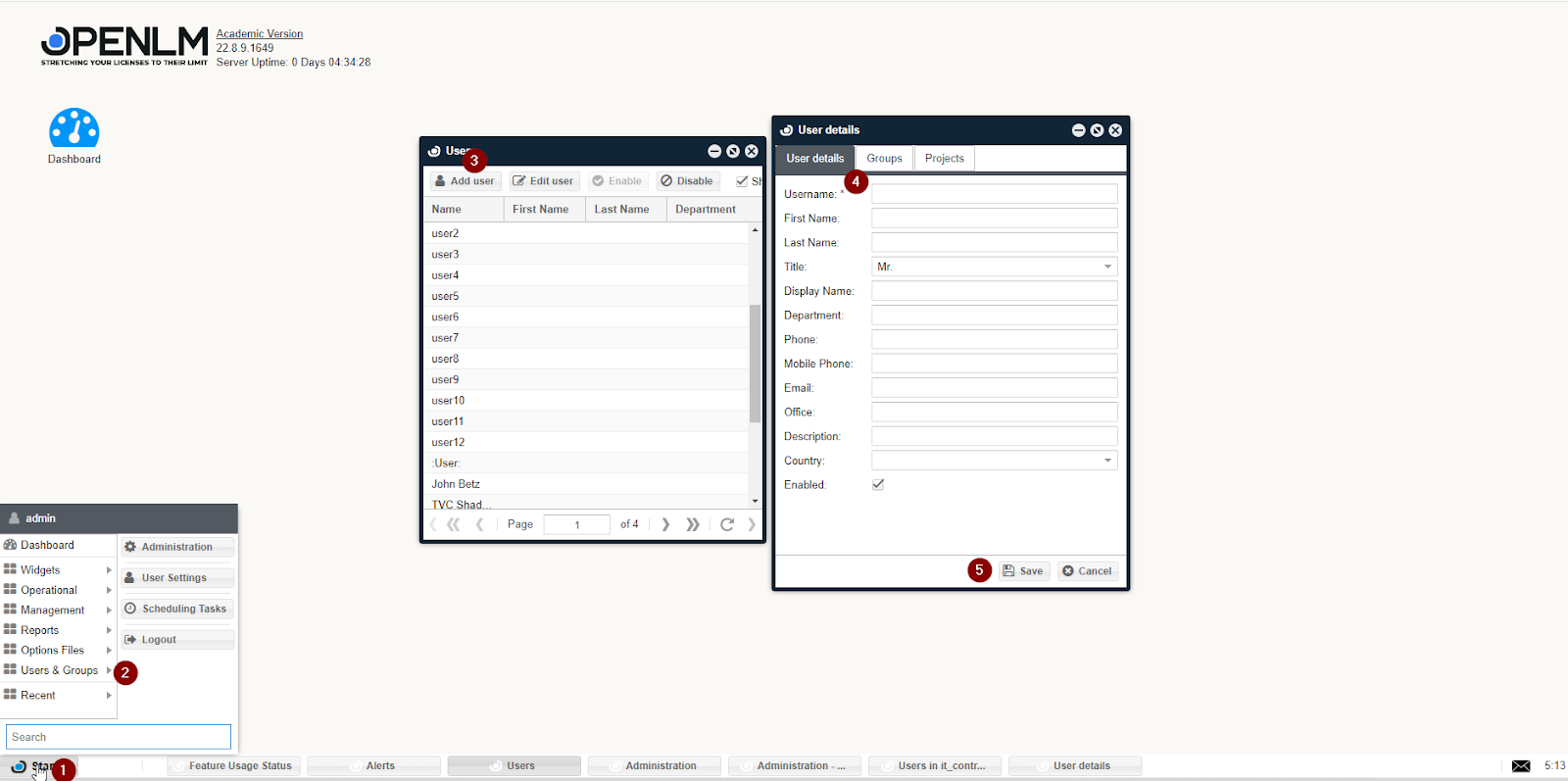
- EasyAdmin User Interface でユーザーアカウントを作成します。
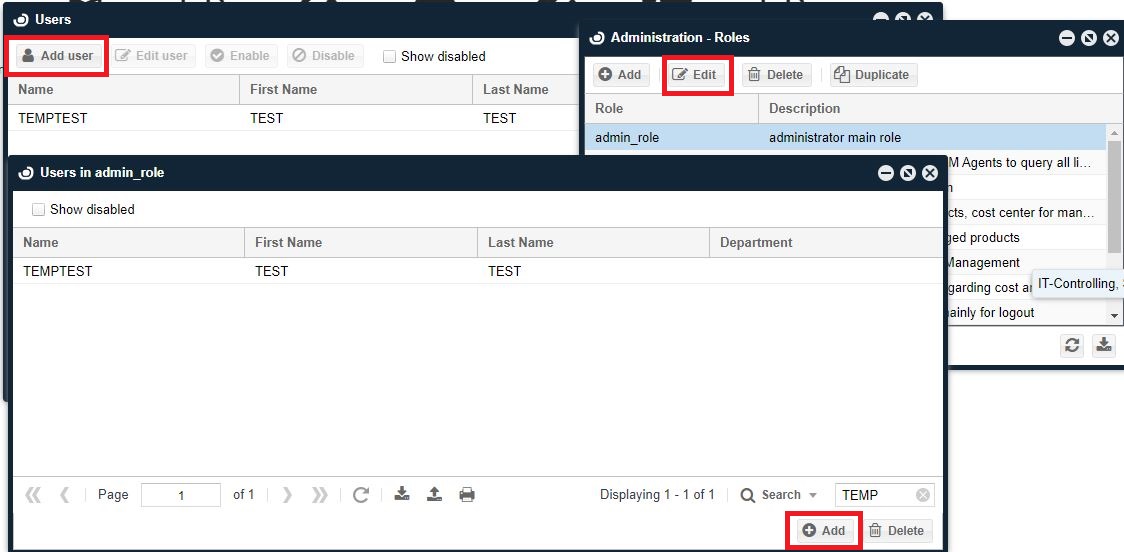
- 作成したユーザーに必要なロールを割り当てます。
- Identity Service で同じユーザーを作成し、パスワードを設定します。
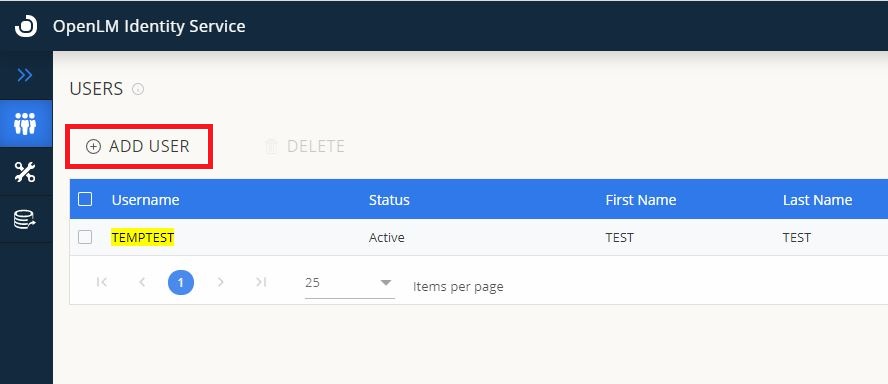
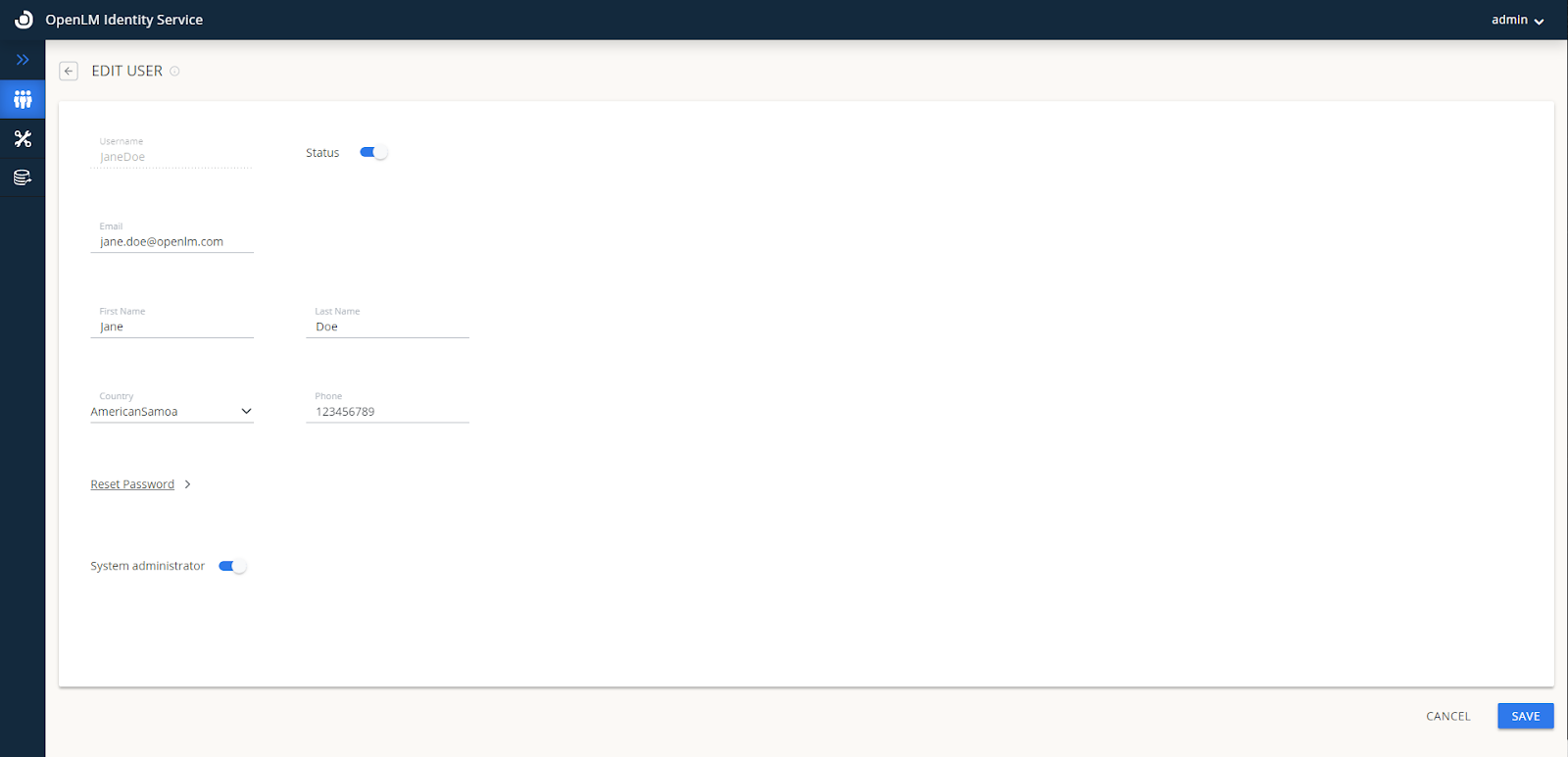 注: Identity Service の設定を編集できるようにするには、System Administrator のトグルを有効にします。
- 作成したユーザーアカウントで EasyAdmin にログインします。
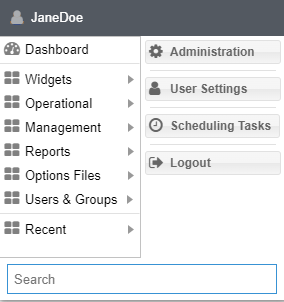
現在は、EasyAdmin と Identity Service の両方で同じユーザーを手動で追加する必要があります。特にパスワードは Identity Service UI のシステム管理者のみが変更できます。
権限とロール
リソースに権限を付与するとは、特定のリソースに対して一定のアクセスレベルを付与することを意味します。各権限は特定のリソースに紐づき、権限属性が設定されます。権限属性は次のいずれかを取ります:
- Allow: リソースがユーザーまたはユーザーグループに対してアクセス可能
- Disable: リソースは表示されるがアクセスできない
- Deny: リソースが表示されずアクセスもできない
これらのリソース権限の集合をロールと呼びます。ロールは会社内の特定の担当グループに割り当てられ、各グループは OpenLM のリソースに対して異なるアクセスオプションを持ちます。 ロールの適用を有効にすると、ユーザーやグループを権限レベルで区別できます。無効にすると、すべてのユーザーとグループがシステムのすべてのリソースに完全にアクセスできる状態になります。 ロールと権限の管理は OpenLM の EasyAdmin 管理インターフェイスで簡単に行えます。直感的な EasyAdmin コントロールパネルには、管理要件に応じてロールや権限グループを設定するための機能が備わっています。
ロールの継承
権限グループには継承プロパティがあります。このプロパティにより、似た権限スキームを複数のグループに適用できます。結果として、わずかな違いだけを持つグループを容易に作成できます。
新しいロールの作成
新しいロールを作成するには、次の手順を実行します:
- EasyAdmin User Interface を開き、管理者のユーザー名とパスワードでログインします。
- まず組織の SMTP サーバーを設定します。OpenLM User Interface を開き、Start → Administration → Email/SMS をクリックし、SMTP サーバー情報を入力してテストメールを送信し、Save をクリックします。
- ロールは OpenLM Administrator 権限で作成し、Identity Service 側にも複製する必要があります。
- EasyAdmin コントロールパネルの Start ボタンをクリックし、Administration → Roles タブを選択します。Administration - Roles ウィンドウが表示され、既定ロールと説明が表示されます。
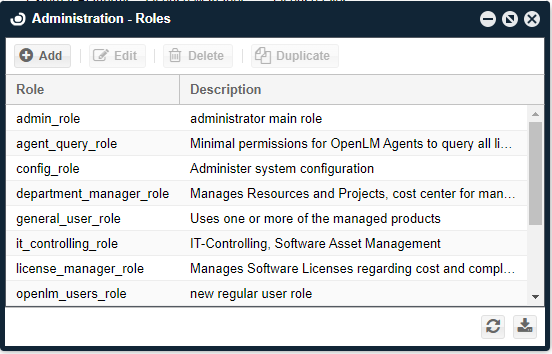
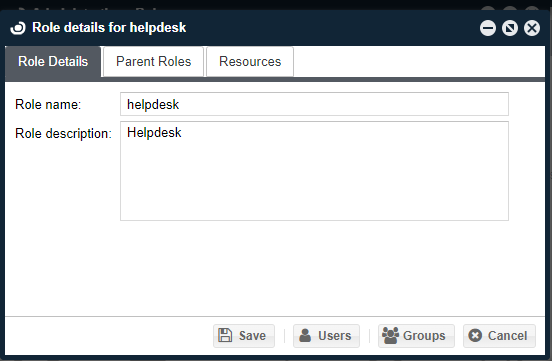
- Add アイコンをクリックしてロールを追加します。Role Details ダイアログが表示されるので、ロール名と説明(例: "HelpDesk" と "Help Desk Team")を入力し、Save をクリックします。新しいロール名は小文字(例: "helpdesk")で保存されます。
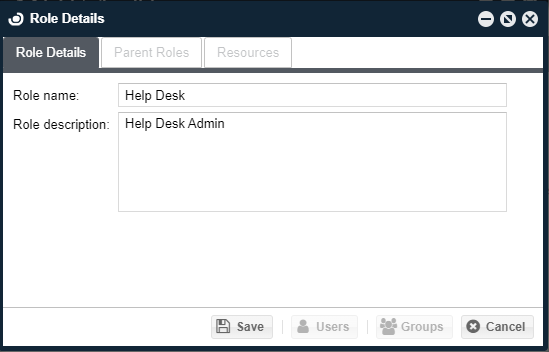 ロール名と説明(例: "HelpDesk" と "Help Desk Team")を入力し、Save をクリックします。新しいロール名は小文字(例: "helpdesk")で保存されます。
ロールへのリソース追加
新しいロールにリソースを追加する方法は 2 つあります。1 つ目はリソースを手動で選択してロールに紐付ける方法です:
- Roles ウィンドウで対象ロール(例: "helpdesk")を選択し、"Edit" アイコンをクリックします。"Role Details for helpdesk" ウィンドウが表示されます(上記の Role Details ダイアログと同様)。既定のロールは編集できない点に注意してください。
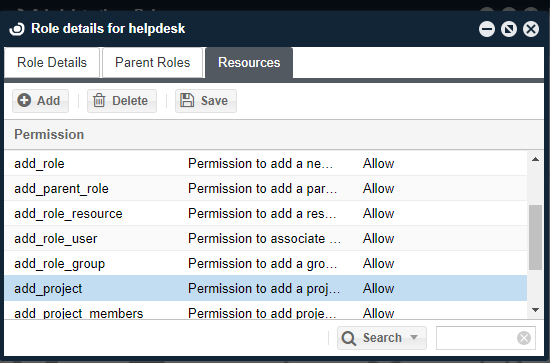
- Resources タブを選択し、Add ボタンをクリックします。Resources Search ダイアログが表示されます。この表の各行にはリソース名と説明があり、OpenLM システム上の機能と紐付けられています。
- リソース(例: add_project)を選択し、Select ボタンをクリックします。"Role Details" ウィンドウの Resources タブに "add_project" リソースが追加されます。
- Resources タブで行を選択し、Permission 欄をクリックします。ドロップダウンが表示され、リソースごとの権限属性を選択できます。
継承プロパティによるリソース権限の追加
- "Role Details for helpdesk" ダイアログで "Parent Roles" タブを選択し、Add アイコンをクリックします。Roles Search ダイアログが表示されます。

- 新しく作成した "helpdesk" ロールの親となるロール(例: "admin_role")を選択し、Select ボタンをクリックします。"admin_role" は既定の基本ロールで、親ロールとして常に利用できます。新しい "helpdesk" ロールは親の "admin_role" が持つ権限属性をすべて継承します。
OpenLM ユーザー
ロールをユーザーに割り当てるには、まず OpenLM データベースにユーザーが存在することを確認する必要があります。ユーザー一覧は EasyAdmin の Start → Users & Groups → Users タブに表示されます。 ユーザーは次の方法で OpenLM データベースに追加できます:
- OpenLM Directory Sync を使用して組織の Active Directory と同期する。
- ライセンス使用状況の監視によって追加する。
- FlexLM ライセンスファイルの読み取りによって追加する。
- FlexLM Options ファイルの読み取りによって追加する。
- 手動で作成する(以下参照)。
手動でユーザーを作成する
EasyAdmin で新規ユーザーを手動で作成するには次の手順を実行します:
- EasyAdmin Start → Users & Groups → Users タブに移動します。Users ウィンドウが表示されます。
- Add User ボタンをクリックします。ユーザー詳細フォームが表示されるので、必要事項を入力し、Enabled にチェックを入れて Save をクリックします。
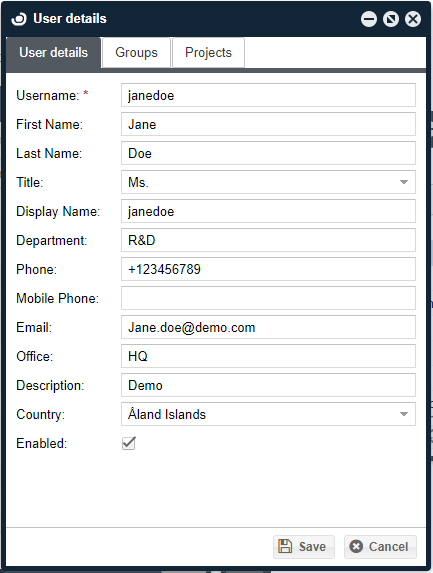
手動でユーザーをグループに追加する
ユーザーをグループに追加する方法は 2 つあります:
- OpenLM データベースを組織の Active Directory と同期する(詳細は Directory Sync ドキュメントを参照)。
- 手動で追加する(以下)。 a. EasyAdmin Start → Users & Groups → Groups に移動します。Groups ウィンドウが表示されます。 b. Groups ウィンドウでグループ(例: "GroupName")を選択し、Members アイコンをクリックしてメンバーを表示します。Users in Group Name ウィンドウが表示されます。 c. Add アイコンをクリックして Group Name にユーザーを追加します。
ユーザーまたはユーザーグループへのロール割り当て
新しいロールを作成しユーザー/グループを用意したら、そのロールを割り当てて権限セットを適用できます。手順は次のとおりです:
- EasyAdmin Start → Administration → Roles に移動します。
- 新しいロール(例: "helpdesk")を選択します。"Role details for help desk" ダイアログが表示されます。
- ウィンドウ下部の Users または Groups ボタンをクリックします。対応するウィンドウ(helpdesk の Users または Groups)が表示されます。
- Add アイコンをクリックします。User search または Groups のウィンドウが表示されるので、ユーザーまたはグループを選択し、Select アイコンをクリックします。追加されたユーザーまたはグループは、Users in the help desk または Groups in the help desk ウィンドウに表示されます。
リソースの権限属性を変更する
特定のロールからリソースへのアクセスを無効化するなど、権限属性を変更する手順:
- EasyAdmin Start → Users and Groups → Workstations に移動します(この例では Workstation が対象リソースです)。
- EasyAdmin Start → Administration → Roles に移動します。
- ロール(例: "helpdesk")を選択し、Edit をクリックします。"Role details for the helpdesk" ダイアログが表示されます。
- Resources タブを選択し、Add アイコンをクリックします。
- リソース(例: control_panel_menu_workstations)を選択し、Select をクリックします。control_panel_menu_workstations リソースが追加されます。
- そのリソースの Permission 属性をクリックします。ドロップダウンが表示されるので、必要な値(例: Disable)を選択します。
- Save をクリックし、OpenLM EasyAdmin UI を閉じて再起動します。
- EasyAdmin コントロールパネルの Start ボタンをクリックし、Users & Groups タブを選択します。Workstation が表示されなくなっていることを確認します。admin_role の表示から削除されています。
ライセンスサーバーのリソース表示
Resource 名が "server_*" で始まるエントリの権限が Disable または Deny の場合、該当するユーザーグループはそのサーバーの項目を表示できません。さらに、そのサーバーは Workstation Agent の "License usage information" ウィンドウからも除外されます。
管理者からよくある質問: 「OpenLM SLM Configuration ウィンドウで管理者アカウントを作成した途端、Agent でのライセンス使用情報がすべてブロックされるのはなぜか?」
答えは、権限を有効にした場合、ユーザーがライセンスサーバーの詳細を閲覧できる権限セットを付与する必要があるためです。以下の手順を実行してください:
- Require Login Credentials を一度オフにし、再度オンにします。上記の「新しいロールの作成」セクションを参照してください。
- 新しいロールにリソースを割り当てます。ロールを保存すると Resources タブが有効になり、既定リソースが 1 つ割り当てられます。ここで "server_servername" という名前パターン(例: server_srv1)を持つリソースを追加します。手順は「ロールへのリソース追加」を参照してください。
- 新しいロールを管理者ユーザーに割り当てます。手順は「ユーザーまたはユーザーグループへのロール割り当て」を参照してください。
権限の競合解決
権限ツールを使用すると、単一ユーザーに対して個別にリソース権限を付与できます。また、前述のとおり権限は親ロールから継承できます。一方が許可し他方が拒否する場合は不整合が発生します。この場合、裁定手続きが実行されます。単一ユーザーに直接付与された権限、または継承階層で最も末端("youngest child")の権限が最も強いと見なされます。同等の強さで矛盾する属性がある場合は、不明な状態になることがあります。 例えば次の状況を考えます:
- admin ロールは Role1 と Role2 の親である。
- admin がリソースを Deny している。
- Role1 はそのリソースを明示的に参照していないため暗黙的に Deny される。
- Role2 はそのリソースを明示的に Allow する。
ユーザー属性:
- ユーザーが 1 つのロールにのみ割り当てられている場合、その権限属性はそのロールと同じになる。
- ユーザーが admin と Role1 に割り当てられている場合、権限は Deny になる。
- ユーザーが Role1 と Role2 に割り当てられている場合、Role2 が最も末端のロールとなるため Allow になる。
- ユーザーが admin と Role2 に割り当てられている場合、不明な状態が発生する。
リソース一覧
利用可能なリソース一覧は以下のとおりです:
| 名前 | 説明 |
| currently_consumed_licenses_column_close_application | Currently Consumed Licenses パネル - アプリケーションを閉じる権限 |
| currently_consumed_licenses_column_remove_license | Currently Consumed Licenses パネル - ライセンスを削除する権限 |
| currently_consumed_licenses_column_username | Currently Consumed Licenses パネル - User Name 列を表示 |
| configuration_form_read | OpenLM SLM Configuration ツールを開く権限 |
| configuration_form_update | OpenLM SLM Configuration ツールを更新する権限 |
| control_panel_menu_currently_consumed_licenses | Control Panel - Operational メニューで Currently Consumed Licenses を表示 |
| control_panel_menu_change_password | Control Panel - Start メニューで Change Password を表示 |
| control_panel_menu_denials | Control Panel - Reports メニューで Denials を表示 |
| control_panel_menu_features | Control Panel - Option Files メニューで Features を表示 |
| control_panel_menu_group_usage | Control Panel - Reports メニューで Group Usage を表示 |
| control_panel_menu_groups | Control Panel - Users & Groups メニューで Groups を表示 |
| control_panel_menu_host_groups | Control Panel - Option Files メニューで Host Groups を表示 |
| control_panel_menu_ips | Control Panel - Option Files メニューで IPs を表示 |
| control_panel_menu_license_activity | Control Panel - Reports メニューで License Activity を表示 |
| control_panel_menu_license_usage | Control Panel - Reports メニューで License Usage を表示 |
| control_panel_menu_licenses | Control Panel - Management メニューで Licenses を表示 |
| control_panel_menu_logout | Control Panel - Start メニューで Logout を表示 |
| control_panel_menu_management | Control Panel - Management を表示(含む: Licenses, Licenses Not In Use, License Utilization, License Procurement, Audit Report, Active Users Report) |
| control_panel_menu_option_files | Control Panel - Option Files を表示(含む: IPs, Host Groups, Options Files Management) |
| control_panel_menu_policy | Control Panel - Option Files メニューで Policy を表示 |
| control_panel_menu_project_usage | Control Panel - Reports メニューで Project Usage を表示 |
| control_panel_menu_released_licenses | Control Panel - Operational メニューで Released Licenses を表示 |
| control_panel_menu_reports | Control Panel - Reports を表示(含む: Project Usage, Group Usage, License Usage, License Activity, Denials) |
| admin_panel_roles | Administration Panel - Roles を表示 |
| control_panel_menu_users | Control Panel - Users & Groups メニューで Users を表示 |
| control_panel_menu_users_permissions | Control Panel - Start メニューで Users & Groups を表示(含む: Users, Groups, Workstations) |
| control_panel_menu_workstations | Control Panel - Users & Groups メニューで Workstations を表示 |
| control_panel_tab | OpenLM User Interface を開く基本権限 |
| user_change_password | 他ユーザーのパスワードを変更する権限 |
| control_panel_menu_administration | Administration の設定を行う権限 |
| add_user | ユーザーを追加する権限 |
| edit_user | ユーザーを編集する権限 |
| add_group | グループを追加する権限 |
| edit_group | グループを編集する権限 |
| delete_group | グループを削除する権限 |
| view_group_members | グループメンバーを表示する権限 |
| add_group_members | グループメンバーを追加する権限 |
| remove_group_members | グループメンバーを削除する権限 |
| add_role | ロールを追加する権限 |
| edit_role | ロールを編集する権限 |
| delete_role | ロールを削除する権限 |
| duplicate_role | ロールを複製する権限 |
| add_parent_role | 親ロールを追加する権限 |
| delete_parent_role | 親ロールを削除する権限 |
| add_role_resource | ロールにリソースを追加する権限 |
| delete_role_resource | ロールからリソースを削除する権限 |
| add_role_user | ユーザーをロールに割り当てる権限 |
| remove_role_user | ロールからユーザーを削除する権限 |
| add_role_group | ロールにグループを追加する権限 |
| remove_role_group | ロールからグループを削除する権限 |
| control_panel_menu_project_list | Control Panel - Management メニューで Projects List を表示 |
| add_project | プロジェクトを追加する権限 |
| delete_project | プロジェクトを削除する権限 |
| edit_project | プロジェクトを編集する権限 |
| add_project_members | プロジェクトメンバーを追加する権限 |
| add_project_groups | プロジェクトグループを追加する権限 |
| enable_project | プロジェクトを有効化する権限 |
| disable_project | プロジェクトを無効化する権限 |
| remove_project_members | プロジェクトメンバーを削除する権限 |
| remove_workstation | ワークステーションを削除する権限 |
| remove_project_groups | プロジェクトグループを削除する権限 |
| control_panel_menu_general_statistics | Control Panel - Widgets メニューで General Statistics を表示 |
| control_panel_menu_license_servers | Control Panel - Widgets メニューで License Servers を表示 |
| control_panel_menu_alerts | Control Panel - Widgets メニューで Alerts を表示 |
| control_panel_menu_feature_usage_status | Control Panel - Widgets メニューで Feature Usage Status を表示 |
| control_panel_menu_license_procurement | Control Panel - Management メニューで License Procurement を表示 |
| license_servers_administer_host | サーバーの start/stop/reread と Broker のリセットを行う権限 |
| control_panel_menu_license_not_in_use | Control Panel - Management メニューで License not in use を表示 |
| enable_or_disable_users | ユーザーを有効/無効にする権限 |
| delete_history | 履歴データを削除する権限 |
| control_panel_menu_all_features | Control Panel - Option Files メニューで All Features を表示 |
| control_panel_menu_recent_feature_denials | Control Panel - Widgets メニューで Recent Feature Denials を表示 |
| control_panel_menu_license_utilization | Control Panel - Management メニューで License Utilization を表示 |
| control_panel_menu_license_usage_heatmap | Control Panel - License Usage Heatmap を表示 |
| enable_or_disable_groups | グループを有効/無効にする権限 |
| currently_consumed_licenses_column_workstation | Currently Consumed Licenses パネル - Workstation 列を表示 |
| license_activity_column_workstation | License Activity パネル - Workstation 列を表示 |
| license_activity_column_username | License Activity パネル - User Name 列を表示 |
| control_panel_menu_operational | Control Panel - Operational を表示(含む: currently consumed licenses, Released licenses) |
| control_panel_menu_widgets | Control Panel - Widgets を表示(含む: License Servers, License Usage Heat Map, Host Availability, General Statistics, Alerts, Recent Feature Denials, Features Usage Status, Selected Feature Statistics) |
| control_panel_menu_host_availability | Control Panel - Widgets メニューで Host Availability を表示 |
| control_panel_menu_audit_report | Control Panel - Management メニューで Audit Report を表示 |
| control_panel_menu_active_users_report | Control Panel - Management メニューで Active Users Report を表示 |
| control_panel_menu_user_settings | Control Panel - Start メニューで User Settings を表示 |
| currently_consumed_licenses_column_host_id | Currently Consumed Licenses パネル - Host Id 列を表示 |
| currently_consumed_licenses_column_first_name | Currently Consumed Licenses パネル - First Name 列を表示 |
| currently_consumed_licenses_column_last_name | Currently Consumed Licenses パネル - Last Name 列を表示 |
| currently_consumed_licenses_column_phone_number | Currently Consumed Licenses パネル - Phone Number 列を表示 |
| currently_consumed_licenses_column_email | Currently Consumed Licenses パネル - Email 列を表示 |
| currently_consumed_licenses_column_start_time | Currently Consumed Licenses パネル - Start Time 列を表示 |
| currently_consumed_licenses_column_ip | Currently Consumed Licenses パネル - IP 列を表示 |
| currently_consumed_licenses_column_duration | Currently Consumed Licenses パネル - Duration 列を表示 |
| currently_consumed_licenses_column_borrowed | Currently Consumed Licenses パネル - Borrowed 列を表示 |
| currently_consumed_licenses_column_linger_time | Currently Consumed Licenses パネル - Linger Time 列を表示 |
| currently_consumed_licenses_column_linger_due | Currently Consumed Licenses パネル - Linger Due 列を表示 |
| currently_consumed_licenses_column_recent_application_idle_period | Currently Consumed Licenses パネル - Recent Application Idle Period 列を表示 |
| currently_consumed_licenses_column_workstation_idle_time | Currently Consumed Licenses パネル - Workstation Idle Time 列を表示 |
| currently_consumed_licenses_column_idle_times | Currently Consumed Licenses パネル - Idle Times 列を表示 |
| license_activity_filter_workstation | License Activity で Workstation フィルターを実行する権限 |
| license_activity_filter_user | License Activity で User フィルターを実行する権限 |
| license_activity_column_first_name | License Activity パネル - First Name 列を表示 |
| license_activity_column_last_name | License Activity パネル - Last Name 列を表示 |
| license_activity_column_ip | License Activity パネル - IP 列を表示 |
| license_activity_column_host_ids | License Activity パネル - Host Ids 列を表示 |
| denials_filter_workstation | Denials で Workstation フィルターを実行する権限 |
| denials_filter_user | Denials で User フィルターを実行する権限 |
| denials_column_user_name | Denials パネル - User Name 列を表示 |
| denials_column_first_name | Denials パネル - First Name 列を表示 |
| denials_column_last_name | Denials パネル - Last Name 列を表示 |
| denials_column_workstation | Denials パネル - Workstation 列を表示 |
| add_project_members_groups | プロジェクトにメンバーグループを追加する権限 |
| remove_project_members_groups | プロジェクトからメンバーグループを削除する権限 |
| view_unmanaged_processes | 未管理プロセスを表示する権限(Administration メニュー) |
| edit_unmanaged_processes | 未管理プロセスを編集する権限 |
| license_activity_column_email | License Activity パネル - Email 列を表示 |
| view_system_messages | システムメッセージを表示する権限 |
| license_usage_filter_user | License Usage で Users フィルターを実行する権限 |
| view_dashboard | Dashboard を表示する権限 |
| view_router_monitoring | Router Monitoring を表示する権限 |
| control_panel_menu_feature_usage_per_group | Control Panel - Reports メニューで Feature Usage per Group を表示 |
| control_panel_menu_feature_usage_per_user | Control Panel - Reports メニューで Feature Usage per User を表示 |
| license_servers_upload_license_file | License Servers → Files ウィンドウでライセンスファイルをアップロード可能にする |
| scheduling_reports_show_all | 全ユーザーの Scheduling Reports を表示 |
| scheduling_reports_show | Scheduling Reports の使用 |
| denials_column_email | Denials パネル - Email 列を表示 |
| license_servers_show_candidates | License Servers ウィンドウで候補サーバーを表示 |
| add_workstation | ワークステーションを追加する権限 |
| view_token_flex_reports | Token Flex レポートを表示する権限 |
| control_panel_menu_named_license_analysis | Control Panel - Reports メニューで Named License Analysis (NNU) レポートを表示 |
| currently_consumed_licenses_filter_user | Currently Consumed Licenses レポートで Users フィルターを実行する権限 |
| currently_consumed_licenses_filter_workstation | Currently Consumed Licenses レポートで Workstations フィルターを実行する権限 |
| currently_consumed_licenses_column_group | Currently Consumed Licenses パネル - Group Name 列を表示 |
| currently_consumed_licenses_column_project | Currently Consumed Licenses パネル - Project Name 列を表示 |
| currently_consumed_licenses_column_vendor | Currently Consumed Licenses パネル - Vendor Name 列を表示 |
| currently_consumed_licenses_column_server | Currently Consumed Licenses パネル - Server Name 列を表示 |
| currently_consumed_licenses_column_feature | Currently Consumed Licenses パネル - Feature Name 列を表示 |
| currently_consumed_licenses_column_product_name | Currently Consumed Licenses パネル - Product Name 列を表示 |
| currently_consumed_licenses_column_version | Currently Consumed Licenses パネル - Version 列を表示 |
| currently_consumed_licenses_column_additional_key | Currently Consumed Licenses パネル - Additional Key 列を表示 |
| currently_consumed_licenses_column_license_type | Currently Consumed Licenses パネル - License Type 列を表示 |
| currently_consumed_licenses_column_handle | Currently Consumed Licenses パネル - Handle 列を表示 |
| currently_consumed_licenses_column_total_licenses | Currently Consumed Licenses パネル - Total Number of Licenses 列を表示 |
| currently_consumed_licenses_column_consumed_tokens | Currently Consumed Licenses パネル - Consumed Tokens 列を表示 |
| view_token_flex_released_idle_licenses | Token Flex の released idle licenses を表示 |
| license_servers_admin_read | License Server を読み取る権限 |
| license_servers_admin_update | License Server を更新する権限 |
| view_license_files | License Files を表示 |
| edit_license_files | License Files を編集 |
| server_OpenLM reusable tokens | OpenLM User Interface の各パネルで server OpenLM reusable tokens のデータを表示 |
| admin_server_OpenLM reusable tokens | License Servers パネル - server OpenLM reusable tokens の Stop/Start/Reread を行う権限 |