
Release notes

Release Notes

The latest OpenLM Platform feature releases, improvements, and bug fixes.

OpenLM Platform — codename C

The next OpenLM Platform release reshapes the post-login experience. A redesigned Homepage replaces the QuickSight lobby with operational signal you can act on, Agent Activity Manager turns mass upgrades into a single action across your fleet of Workstation Agents, License File Management brings editing, validation, and deployment of license files into one workspace, and the MCP Reporting Server opens your reporting data to AI assistants for plain-language queries.

Spotlight

New Homepage dashboard

The post-login screen is no longer a lobby of nav tiles — it is a real operational dashboard. The QuickSight-backed Homepage has been replaced with a native Angular widget grid that surfaces license health, denial volume, and pool utilization the moment you sign in. First paint is faster, the cloud-only dependency is gone, and every widget plugs into a shared shell so loading, empty, and error states behave the same way across the board. See the Homepage changelog for the full per-version history.

  • KPI summary cards for license servers offline and denied requests, each with a one-click deep link into the underlying view.
  • License Servers Status donut breaking your fleet down into Healthy, Pending, and Error states, so a single outage no longer hides behind an aggregate.
  • Top 5 Denied Features and Top 5 Features in Use, side by side — see where demand is hitting the ceiling and where engineering teams are spending the budget.
  • Top 5 Saturated and Top 5 Underutilized License Pools, side by side — surface reclaim opportunities without writing a custom report.
  • Usage trend and Upcoming expirations & renewals widgets, plus a severity-aware alert bar that surfaces critical signal at the top of the page.
  • Take the Tour guided walkthrough for first-time admins, and an SLM activation gate that shows a clear lock card instead of empty widgets when SLM is inactive.
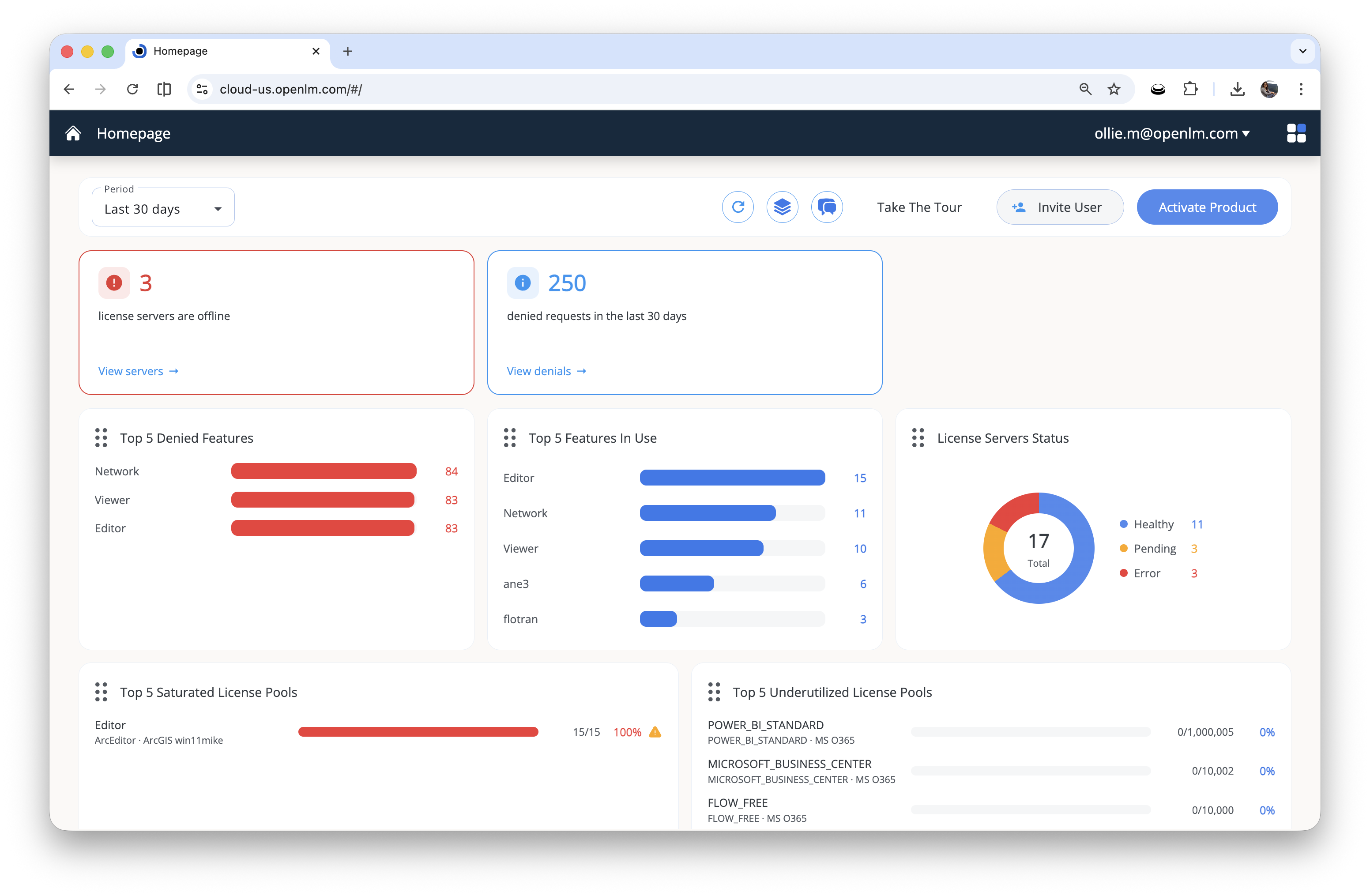
New OpenLM Homepage dashboard with KPI cards for offline servers and denied requests, a license server health donut, denied features and features-in-use bar charts, and saturated and underutilized license pool widgets
The redesigned Homepage surfaces license server health, denial trends, top features, and license pool utilization in a single post-login view.
Spotlight

MCP Reporting Server

OpenLM now speaks the Model Context Protocol (MCP), the open standard for connecting AI assistants to live business data. Point Claude, ChatGPT, Cursor, Windsurf, Gemini CLI, or any other MCP-aware client at your tenant, sign in once with OAuth, and ask questions in plain language: "Which features were denied most often last month?", "Show me underused AutoCAD seats by office." The MCP Reporting Server translates your prompt into a GraphQL query against your reporting database and returns tables, summaries, or — on higher-tier AI plans — fully interactive dashboards. No new BI tool to learn, no exported CSVs, no hand-built filters. Your reporting data, conversational.

Endpoints are provided for both regions — https://cloud-us.openlm.com/mcp for US and https://cloud-eu.openlm.com/mcp for EU. See the MCP Reporting Server documentation for client setup and the full tool reference.

Spotlight

Mass upgrade Workstation Agents from Agent Activity Manager

Updating Workstation Agents one machine at a time is over. From Agent Activity Manager, select any subset of agents across your fleet, pick a target Workstation Agent version, and trigger the upgrade in a single action. There is no per-machine MSI work, no need to touch endpoints individually, and rollout progress is visible in one place. Use it to deploy a hotfix to a single team, stage a phased rollout, or move an entire organization onto the latest agent on the same day.

Spotlight

License File Management (LFM)

LFM brings license-file editing, validation, and deployment into one place. Work safely with drafts before you push, see each file's parsed features as a structured table, compare versions at both the text and feature level, and let LFM keep license-file to license-server links in sync with SLM — triad-aware, with a full per-file event history. See the License File Management documentation for the full feature reference.

  • Automatic synchronization between LFM and SLM, keeping license server names in sync with license files (including triad members).
  • License file history with a per-file event timeline covering drafts, deployments, deactivations, and deletions.
  • Parsed license features shown as a structured table — feature name, vendor, version, license type, start and expiration dates, quantity, and key.
  • Compare different versions of the same license file: side-by-side raw-text comparison and a parsed-features table comparison that highlights added, removed, and changed features.
  • Pre-validation of license files before pushing to Broker Hub, with file-text verification and warning detection (structural, semantic, and server-availability checks).

Downloads moved to Platform Administration

Installers for both Platform and Legacy products now live in a single place — Platform Administration → Products → Downloads. Switch between the Platform and Legacy tabs to find every component alongside its version and a link to its documentation.
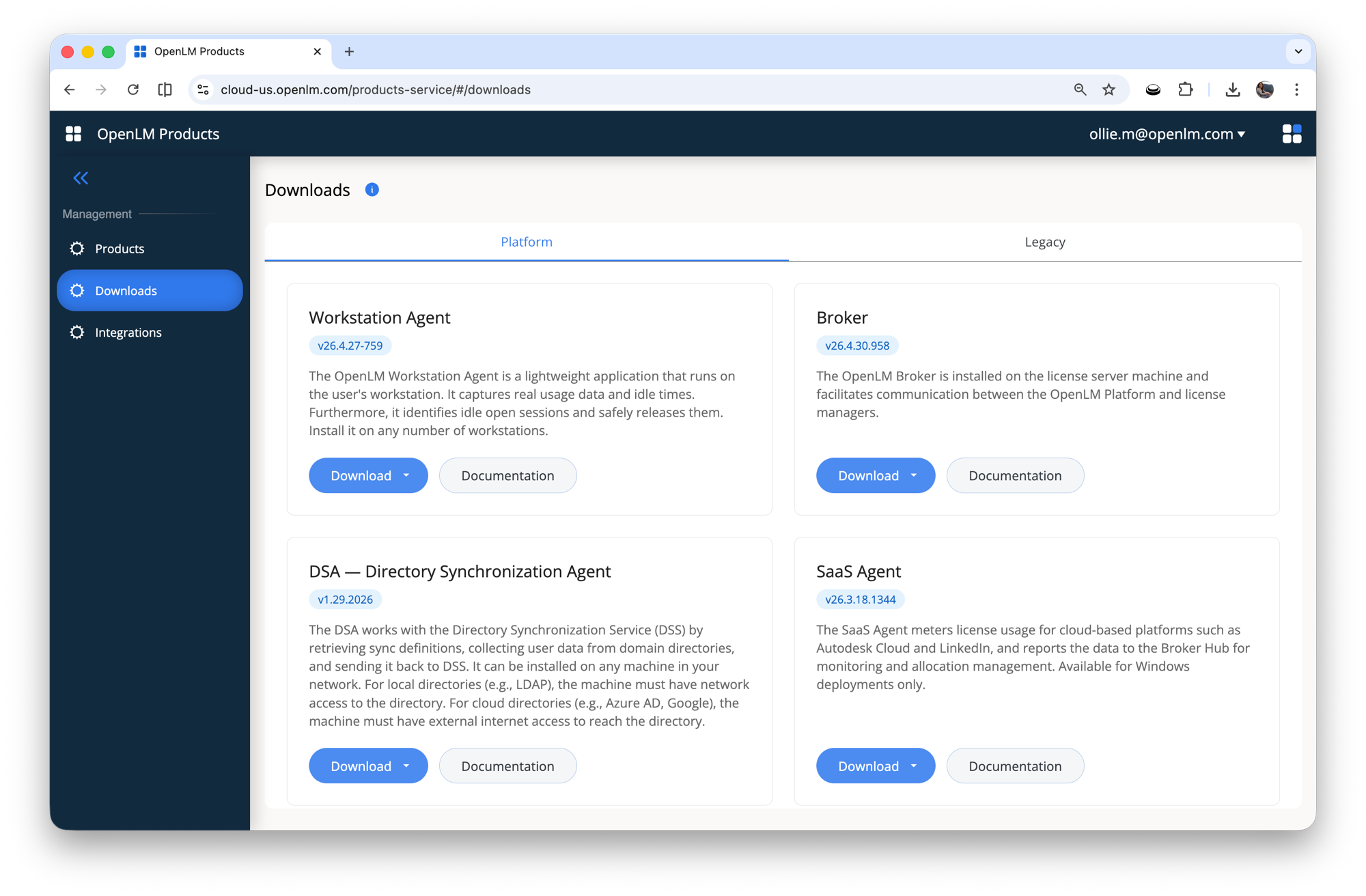
OpenLM Products page showing the Downloads view with Platform and Legacy tabs, listing Workstation Agent, Broker, DSA, and SaaS Agent each with a Download button and a Documentation link
Platform Administration → Products → Downloads: every installer in one place, with Platform and Legacy on separate tabs.

Additional updates

More items will land in this section as the release approaches.

OpenLM Platform - Broad Peak release

This update delivers deeper financial visibility, smarter software mapping, and a new intelligence layer that turns usage data into proactive decisions.

Spotlight

License Access Control (LAC)

LAC turns license management into policy-driven enforcement: define rules for who can use which features and when, and LAC compiles and deploys option files to your license manager for checkout-time enforcement. Policies bundle rules (with optional schedules), audit logs capture granted and denied attempts, and integrations with UGS and the Features Service validate users, groups, and features.

  • Integrated with SLM to improve responsiveness when license servers are deleted or disabled. Policies, Rules, and Assets that require a license server now show error icons with explanatory tooltips.
  • Integrated with UGS to improve responsiveness when Users & Groups are deleted or disabled. Rules that depend on those entities now show error icons with explanatory tooltips.
  • Fixed incorrect deployment behavior that caused queue records to disappear without an error or history record.

Advanced reporting and the SAM cost module

  • Feature-wise cost tracking: You can now track costs at the individual feature level. Data is ingested via Purchase Orders (PO), Delivery Orders, CSV imports, or manual entry.
  • Wastage analysis: The system identifies the gap between what you bought and what you use. Calculation: Wastage = Investment - Usage. Example: If you pay for 10 hours of daily availability but only utilize 50 hours total in a year, the system flags the specific dollar amount lost.
  • Time-based reporting: Track costs per hour, week, quarter, or year.
  • Locational / geographical compliance: Ensure licenses are used in authorized regions.
  • License utilization: Deep dive into seat efficiency.
  • Borrowed licensing: Visibility into offline license usage.

Software catalogue and mapping

  • Global vs. local catalogue: Users can provide a local catalogue, and OpenLM will map it against a global catalogue to ensure standardized naming conventions.
  • Parent-child mapping: Seamlessly map features such as MS Word to their parent subscriptions, such as MS Office.
  • Process-feature mapping: Align specific software features with the business processes they support.
  • Compliance tracking: Identify non-compliance risks triggered by either unauthorized features or unauthorized users.

Business Intelligence (BI): The insight layer

  • Quick Suite insights: Proactive management with data that highlights issues before they become blockers.
  • Underuse and overuse detection: Instant identification of shelfware versus licenses causing productivity bottlenecks due to shortages.
  • Operational insights: Strategic data points to help IT managers make faster renewal decisions.

Artificial Intelligence (AI) and natural language

  • Scenario / What-if analysis: A predictive tool that lets you model how changing license count or model impacts budget and denial rates.
  • NLQ (NLP-based dynamic query generation): A chatbot interface that lets you interact with data using natural language queries.
InputShow me a chart of who used the most AutoCAD licenses in the London office last month.
OutputA dynamic visualization and a plain-English summary.

Identity Discovery

Use the Identity Discovery service to track login activity from your identity providers (IdPs). Identity Discovery collects user login events and brings them into OpenLM so you can see who logged in, when they logged in, and what service they used. Identity Discovery supports multiple identity accounts, including several accounts of the same type.

Note: Identity Discovery collects only login metadata. It does not collect passwords or authentication secrets.

Cloud Broker: Expanded SaaS coverage

Cloud Broker now supports these SaaS platforms: Bentley, Figma, ZoomInfo, Priority, Monday.com, Syncfusion, Adobe, Zoho, Apollo.io, QuickSuite, Cadenas, Canvas, Materialise Magic, Ash Ware, GNS, OGI, and ETAP.

Additional updates

  • Real-time communication for dongle monitoring in the agent.
  • Material migration.
  • Support for command-line arguments and window title monitoring for processes.
  • Disable process harvesting for specific users during specific timeframes.
  • Improvements to the process monitoring flow.
  • Fixes to process session creation.
  • Improvements to EUS notifications UX.
  • Remove License from Currently Consumed Licenses window was added.
  • Bug fixes.
  • New alert type integrations: LFM Triads.
  • DSS UI: add anonymous property to domain settings.
  • Cloud partners in Cloud Admin UI.
  • UGS: automatic user alias creation.
  • Clean Up manager in UGS.

What will be released in the nearest future

These items are actively in flight and will roll out after Broad Peak.

  • Anonymization Service.