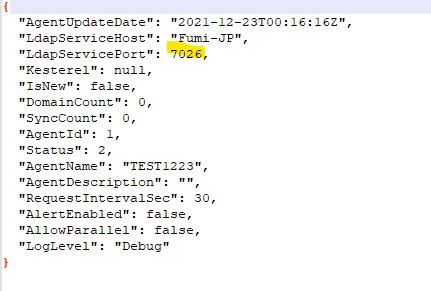
How to change the OpenLM components' ports
Ports changing
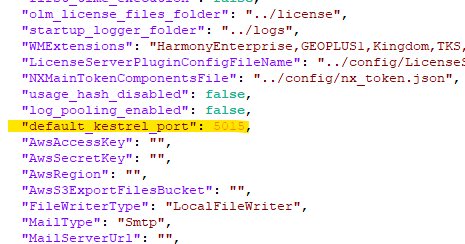
Please note, that it's not enough to just change listening ports. After changing the listening port number, make sure all other components that connect to it as a client, are also updated for the new port number. E.g. if you change Server port 5015 to something else, you also need to change other components to use the new port because they are connecting to Server API through 5015.
OpenLM Server
Access C:Program FilesOpenLMOpenLM Serverbinappsettings.json to make the required changes:

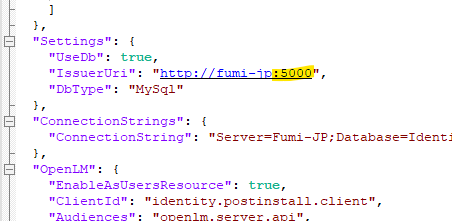
Identity Service
Go to C:Program FilesOpenLMOpenLM Identity ServiceSecurityServiceappsettings.json

If you are changing ports of other components:

Broker
Change the ports of OpenLM Server, then you can use other ports other than 5015 in the Broker configuration tool.
Broker UI
Access C:Program FilesOpenLMOpenLM Brokerbroker.xml

End-User Services
Access C:Program FilesOpenLMEnd-User Servicessettings.json

If you are changing ports for other components:

Workstation Agent
If you are changing ports for other components,
C:Program FilesOpenLMAgentsettings.json
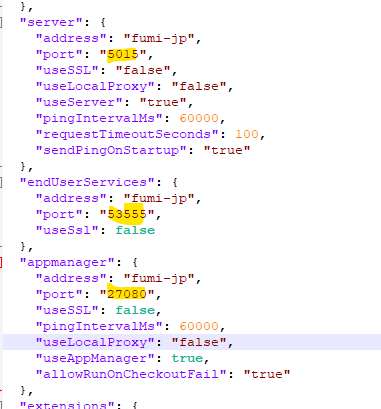
Applications Manager
C:Program FilesOpenLMOpenLM Applications Manageropenlm-app-manager.properties
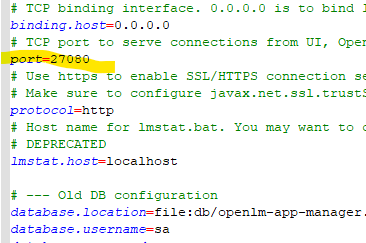
If you are changing ports for other components,
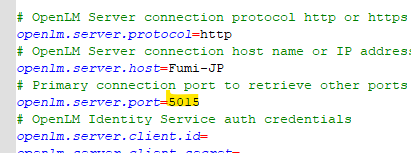
Reports Scheduler
C:Program FilesOpenLMOpenLM Reports Schedulerreport_scheduler.properties

C:Program FilesOpenLMOpenLM Serverbinwwwrootparams.js
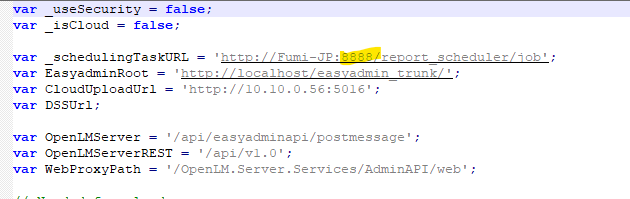
If you are changing ports for other components,
C:Program FilesOpenLMOpenLM Reports Schedulerreport_scheduler.properties.
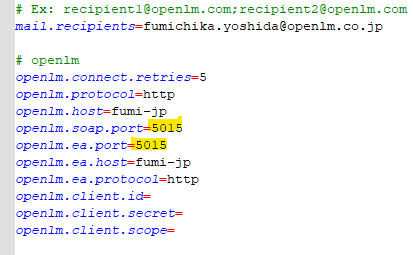
DSS
C:Program FilesOpenLMOpenLM Directory Synchronization Servicekestrel.config

DSA
C:Program FilesOpenLMOpenLM Directory Synchronization Agentkestrel.config

If you are changing ports for other components,
C:Program FilesOpenLMOpenLM Directory Synchronization AgentOpenLM.Ldap.Agent.config