
OpenLM Docs
  • Home
  • Supported Software
  • Blog
  • Knowledge Base
  • Home
  • Supported Software
  • Blog
  • Knowledge Base
  • OpenLM System Architecture
  • Quick Start Guide: OpenLM – Engineering Software License
  • OpenLM SLM Installation Guide
    • Setting up SSL for OpenLM SLM and Identity Service
    • The OpenLM EasyAdmin User Interface
    • OpenLM Easy Admin User Interface Modules and Reports
      • OpenLM User Interface Reports  Samples
      • Named License Analysis (NNU) Report
      • License Denials Reporting
      • Determining license utilization efficiency
      • Historical license usage reports
    • OpenLM EasyAdmin User Interface - Administration
      • Products and Packages
      • Cleanup Manager module
      • Denials
      • Configuring the License Checkout Policy
      • OpenLM Server DNS resolving
      • OpenLM usability report files
      • How to change the OpenLM components' ports
  • OpenLM Identity Service Installation guide
    • OpenLM SLM and Identity Service Installation on Linux using RPM, DEB, and TAR Packages
    • Identity Service Configuration
      • Integration Between OKTA SSO and OpenLM
      • KeyCloak integration with OpenLM
      • Integration Between AD FS and OpenLM
      • Integration Between Azure Active Directory And OpenLM
  • OpenLM Broker Installation on Windows
    • OpenLM Broker Web UI
    • Installing OpenLM Broker on Unix / Linux
    • OpenLM Broker Configuration
    • OpenLM Broker Connectivity Through HTTP Proxy Server
    • Troubleshoot OpenLM Broker by EasyAdmin User Interface messages
  • OpenLM Applications Manager Installation Guide
    • Installing two instances of Applications Manager in parallel
    • Applications Manager Installation on Linux
    • HTTPS/SSL support for Applications Manager and Broker
    • OpenLM Applications Manager Configuration
    • Optimal Configuration for Applications Manager
    • OpenLM Applications Manager Database Configuration Tool
    • Configure Applications Manager to Track Actual Usage
  • Directory Sync Installation Guide
    • Directory Sync v2x Configuration
  • OpenLM Reports Scheduler Installation Guide
    • OpenLM Reports Scheduler Configuration
  • End-User Services & Workstation Agent Installation guide
    • Workstation Agent installation with Microsoft System Center Configuration Manager (SCCM)
    • The OpenLM Workstation Agent's interface - the Personal Dashboard
      • How to set up the Personal Dashboard authentication
      •  Personal Dashboard User authentication
    • OpenLM AutoCAD Plugin Installation Guide
    • URL Monitoring With OpenLM
  • OpenLM ServiceNOW Adapter Installation and Configuration
  • OpenLM Reporting Hub Installation Guide
    • OpenLM Reporting Hub Data Structure
    • OpenLM Reporting Hub and customized license reporting
    • OpenLM Reporting Hub vs Embedded Reports Comparison
    • OpenLM Reporting Hub Upgrade
  • OpenLM SLM Features
    • License Allocation Manager - Options File management Using OpenLM EasyAdmin User Interface
    • OpenLM Alerts Configuration
    • OpenLM Roles & Permissions
    • OpenLM Group Usage Configuration
      • Introducing Entities in OpenLM - Users, Groups, IP and Hosts
    • License harvesting (Manual method), and Monitoring Idle Application time
      • License Harvesting of Idle Applications (MATLAB, AutoCAD, ArcGIS, ArcGIS Pro, SOLIDWORKS, and CATIA) – Save and Close
        • License Harvesting of Idle FlexLM Applications
          • License retrieval of idle applications – Enhanced Workstation Agent procedures
    • OpenLM Actual Usage
    • OpenLM Project Usage
    • OpenLM Unmanaged Processes
  • Software License Management Cloud Registration and Configuration Guide (SLMC)
    • OpenLM Virtual License Manager: A Comprehensive Guide
    • LDAP Connector Configuration
    • OpenLM Cloud Logs uploader
  • API
  • What is?
    • What is BetaLM?
      • What is EasyCopy?
      • What is SEH-UTN Manager?
      • What is LS-DYNA ? - KB
      • What is ArcGIS Online?
      • What is EPLAN LM?
      • What is Autodesk Cloud?
      • What is FlexLM? What is FlexNet Publisher? Who is Flexera?
      • What is Intergraph SPLM?
      • What is DSLS ?
      • What is IBM Rational: FlexNet Token based licensing
      • What is NVIDIA License Manager?
      • What is Adobe Cloud?
      • What is Olicense?
      • What is Office 365?
      • What is Reprise RLM ? - KB
      • What is FlexLM License file format
      • What is ArcGIS Pro ? - KB
      • What is Sentinel HASP ? - KB
      • What is the difference between the FlexLM lmgrd and lmadmin license server managers - KB
      • What is LM-X?
      • What is License4J?
      • What is OpenText License Manager?
      • What is Sentinel RMS ? - KB
      • What is the Green Hills license manager ?
      • What is SlickEdit ?
      • What is the Altium License Manager?
        • What is the SolidNetwork License Manager (SNL)?
      • What is ProgeCAD?
      • What are Pitfalls in license utilization
      • What is Codemeter?
      • What is FlexNet Embedded?
      • What is MathLM?

OpenLM Reporting Hub and customized license reporting

565 views 1

Written by Maria Gilca
November 20, 2023

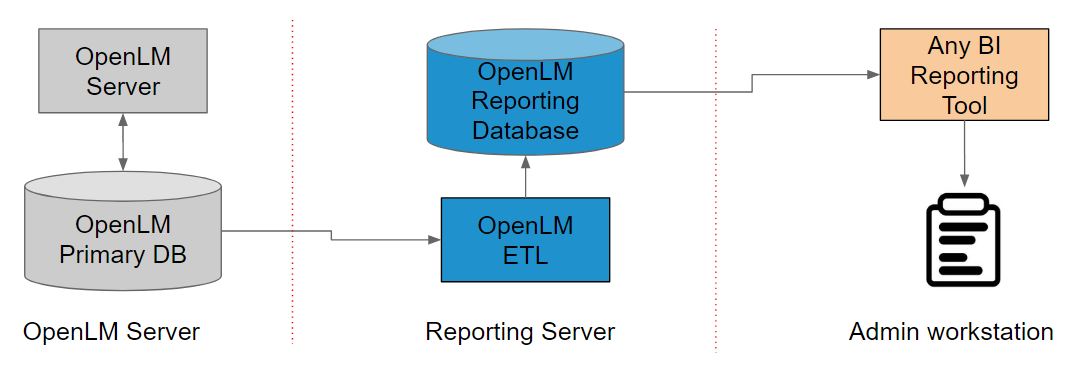
What is the OpenLM Reporting Hub?

Outlying Procedure

  • Extracts specific data from the OpenLM database.
  • Transforms the data structure for the purposes of querying and analysis.
  • Loads the newly formed data structures onto a data warehouse database.
  • BI tool extracts the relevant data from the data warehouse, to be calculated, customized, displayed, and sent out in any supported format.
  • See the options available for the OpenLM Reporting Hub Cloud.
 

Benefits of the Usage Analytics System

  • Stable data structure – Reporting database structure remains stable along different versions of OpenLM.
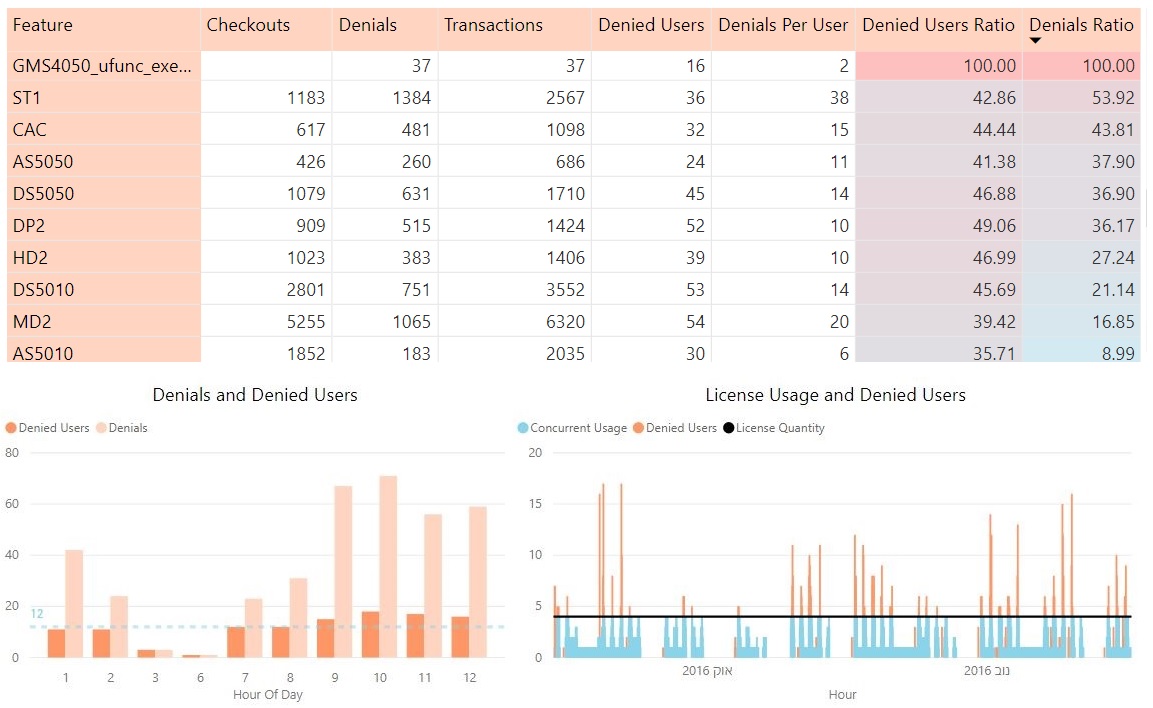
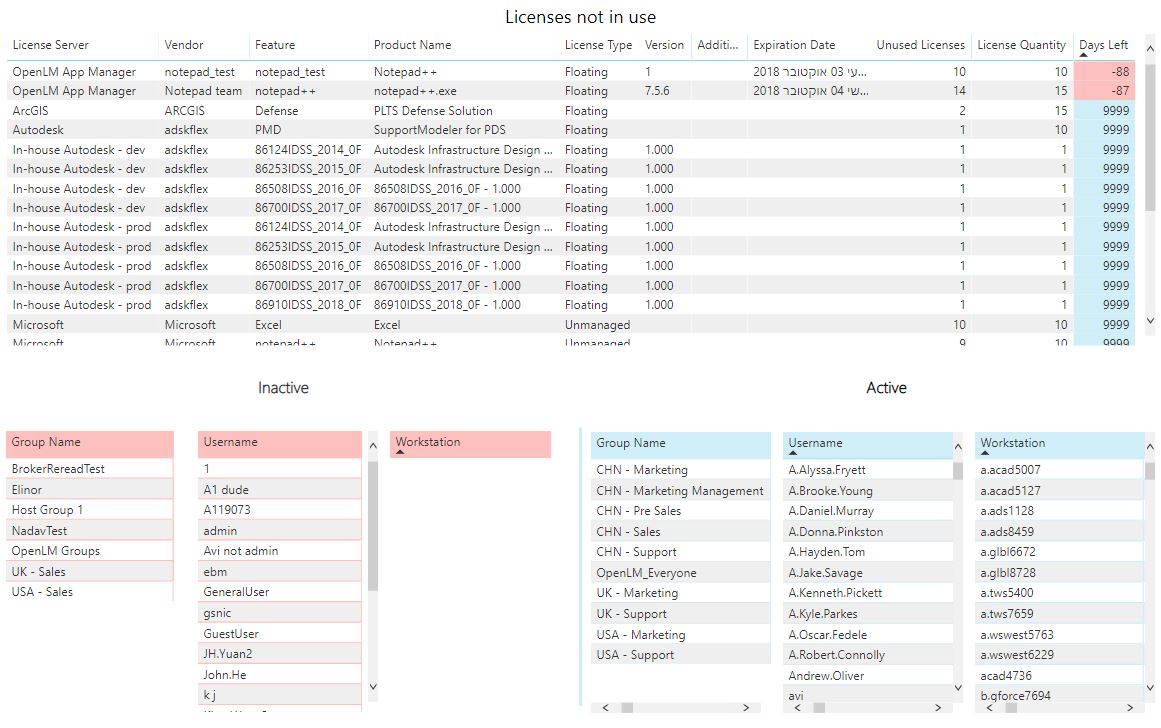
  • Custom fields – New reports and data inquiries that are not found in the OpenLM Easyadmin tool can be produced.
  • Custom calculations – The BI platform allows for complicated and unique calculations to be done on pre-existing data located in the OpenLM database.
  • Custom filters – Filters can be customized by custom-calculated data fields.
  • Big data – Search huge databases quickly using data warehousing techniques.
  • Custom charts and graphs – Customizable charts allow the user to view the data in an infinite number of ways.
  • Robust usage resolution – Aggregate usage by different time span resolutions.


Reporting Database structure

  • User-friendly measure-dimension structure, which allows for easily managing different fields
  • The rigid structure does not change with every upgrade.
  • Creating new calculated fields is made simple.
  • See a visualization of the reporting database structure.


How do I get the OpenLM Reporting Hub and customized reporting extension?

Currently, the installation and configuration of the OpenLM Reporting Hub and reporting system require the presence of an OpenLM support person.

Please contact our support team at support@openlm.com , and our representatives will be glad to assist and guide you online.
 

Was this helpful?

1 Yes  No
Related Articles
  • API
  • OpenLM Cloud Logs uploader
  • KeyCloak integration with OpenLM
  • OpenLM Virtual License Manager: A Comprehensive Guide
  • LDAP Connector Configuration
  • Software License Management Cloud Registration and Configuration Guide (SLMC)

Didn't find your answer? Contact Us

Leave A Comment Cancel reply

Previously
OpenLM Reporting Hub Data Structure
Up Next
OpenLM Reporting Hub vs Embedded Reports Comparison
OpenLM Learning
Search
  • About Us
  • Contact Us
Twitter Facebook-f Youtube Linkedin

Products

  • Software License Management (SLM)
  • Software License Management Cloud
  • OpenLM Academic Program
  • OpenLM License Allocation Manager
  • OneDirectorySync
  • Virtual License Manager – VLM
  • OpenLM Directory Sync
  • OpenLM Applications Manager
  • OpenLM Features
  • Software License Management (SLM)
  • Software License Management Cloud
  • OpenLM Academic Program
  • OpenLM License Allocation Manager
  • OneDirectorySync
  • Virtual License Manager – VLM
  • OpenLM Directory Sync
  • OpenLM Applications Manager
  • OpenLM Features

What We Support

  • CAD Manager Tools
  • Supported License Managers
  • Supported Software & Vendors
  • License Manager Hosted (LMH)
  • OpenLM for Autodesk – A practical guide
  • OpenLM Token-based licenses
  • What is Sentinel HASP
  • CAD Manager Tools
  • Supported License Managers
  • Supported Software & Vendors
  • License Manager Hosted (LMH)
  • OpenLM for Autodesk – A practical guide
  • OpenLM Token-based licenses
  • What is Sentinel HASP

Resources

  • Downloads
  • Knowledge Base
  • Release Notes
  • Blog
  • Case Studies
  • Testimonials
  • Developers
  • Free Trial
  • OpenLM End User License Agreement
  • OpenLM SaaS EULA privacy policy
  • Downloads
  • Knowledge Base
  • Release Notes
  • Blog
  • Case Studies
  • Testimonials
  • Developers
  • Free Trial
  • OpenLM End User License Agreement
  • OpenLM SaaS EULA privacy policy

Company

  • About OpenLM
  • Our Team
  • Careers
  • Contact Us
  • Partner with OpenLM
  • GSA Contact Holder
  • Press Release
  • About OpenLM
  • Our Team
  • Careers
  • Contact Us
  • Partner with OpenLM
  • GSA Contact Holder
  • Press Release

Copyright © 2024 OpenLM | 19266 Coastal Hwy Unit 4-520 Rehoboth Beach DE 19971