ActiveCampaign
ActiveCampaign Usage Monitoring
About ActiveCampaign
ActiveCampaign is an all-in-one marketing and customer relationship management (CRM) platform used for email marketing, sales automation, and lead management. It helps businesses automate marketing workflows and enhance customer engagement. Monitoring ActiveCampaign usage is important for optimizing subscription costs and ensuring that marketing licenses are used effectively. This is similar to monitoring other CRM platforms like HubSpot or Salesforce.
Prerequisites
To begin monitoring ActiveCampaign, ensure you have the following components and permissions in place:
- OpenLM Components:** OpenLM Cloud Broker is required for data collection. You'll also need OpenLM SLM (Software License Manager) for basic monitoring.
- Platform-specific Requirements: You'll need administrative access to your ActiveCampaign account to generate an API key and API URL. For instructions, see the official ActiveCampaign authentication documentation.
Configuring data collection
- Follow these step-by-step instructions to set up data collection for ActiveCampaign in OpenLM Cloud Broker:
Your ActiveCampaign API URL and Key are located on the Developer Settings page in your account:
-
Click "Settings" (gear icon).
-
The Account Settings menu will appear. Click the "Developer" option.
-
Copy and paste your API URL and Key into your 3rd party application.
-
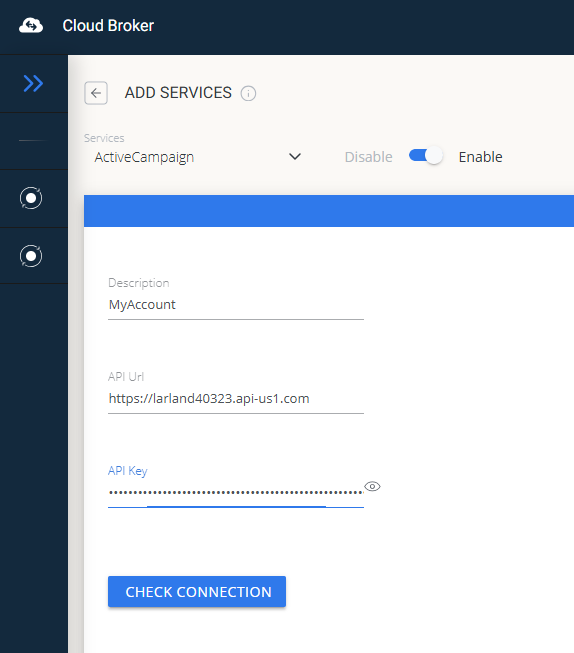
Add Credentials: Go to the OpenLM Cloud Broker click on Add a Service then select Active Campaign, and enter the API URL and Key: .
-
Verify Connection: Test the connection to confirm successful communication.
-
Approve in OpenLM: Approve the new data source within the License Servers section.
-
See Data: You can now view usage data for ActiveCampaign in the OpenLM Allocation service.
Viewing reports
Access your reports to analyze usage patterns.
- User Activity Trends: See which users are most active in the platform, allowing you to reallocate licenses as needed.
- Expired/Unused License Reports: Identify and reclaim licenses from inactive users.