Office 365 / Azure
Office 365 / Azure Usage Monitoring
About Office 365 / Azure
Office 365 is a cloud-based productivity suite that includes Word, Excel, Teams, and more. Azure is a comprehensive cloud computing platform for building, deploying, and managing applications and services. Companies monitor these platforms to reduce license waste, ensure compliance, and align subscriptions with actual usage. This is similar to monitoring other productivity suites like Google Workspace or other cloud services like Autodesk Cloud or Firebase.
Prerequisites
To begin monitoring Office 365 / Azure, ensure you have the following components and permissions in place:
- OpenLM Components: OpenLM Cloud Broker and OpenLM SLM are required.
- Platform-specific Requirements: You need a global administrator role in your Microsoft 365 tenant to grant permissions for the Microsoft Graph API.
Configuring data collection
Follow these step-by-step instructions to set up data collection for Office 365 / Azure in OpenLM Cloud Broker:
- Enable API Access: Register OpenLM Cloud Broker as an application in Azure Active Directory (now Microsoft Entra ID) and grant it read permissions for user and reports data.
- Add Credentials: In the OpenLM Cloud Broker dashboard, find the Office 365 / Azure integration and enter Client ID, Client Secret, Tenant ID and Service ID.
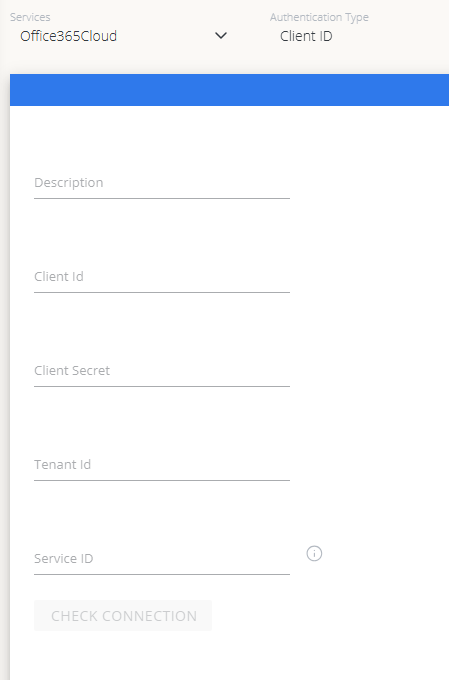
- Verify Connection: Test the connection to ensure OpenLM can successfully communicate with the Microsoft Graph API.
- Approve in OpenLM: Approve the new data source within the License Servers section.
- See Data: Usage data for Office 365 / Azure will now be visible in the OpenLM Allocation service.
Viewing reports
Access your reports to analyze usage patterns.
- User Activity Trends: See how often users are utilizing applications like Teams, Word, and Excel.
- Expired/Unused License Reports: Identify and reclaim licenses from inactive users.