BambooHR
Configuring data collection
Follow these steps to configure BambooHR data collection in OpenLM Cloud Broker.
BambooHR uses OAuth 2.0 for authentication. You must create a BambooHR application to obtain the required credentials.
Step 1: Gather required BambooHR information
From your BambooHR account, collect the following:
-
Company subdomain
If you access BambooHR athttps://mycompany.bamboohr.com, the subdomain ismycompany. -
OAuth application credentials
- Client ID
- Client secret
- Redirect URI
For detailed setup instructions, see the official BambooHR documentation:
https://documentation.bamboohr.com/docs/getting-started#section-authentication
Step 2: Authorize the application
Initiate the authorization request using a browser or curl:
https://<company-domain>.bamboohr.com/authorize.php?request=authorize&state=new&response_type=code&scope=<scopes separated by +>&client_id=<your client ID>&redirect_uri=<your redirect URI>
After authorization, BambooHR redirects to the specified redirect_uri with a temporary authorization code:
?code=<temporary authorization code>
Store the authorization code securely. You need it only once to generate the initial access token.
Step 3: Generate an access token
Exchange the authorization code for an access token.
Endpoint
https://<company-domain>.bamboohr.com/token.php?request=token
Request body
{
  "client_secret": "<your client secret>",
  "client_id": "<your client ID>",
  "code": "<temporary authorization code>",
  "grant_type": "authorization_code",
  "redirect_uri": "<redirect URI>"
}
Response
{
  "access_token": "<temporary access token>",
  "expires_in": 3600,
  "token_type": "Bearer",
  "scope": "<scopes separated by space>",
  "refresh_token": "<temporary refresh token>",
  "id_token": "<unique ID>",
  "companyDomain": "<your company domain>"
}
Use the access_token for subsequent API calls. In tools such as Postman, select Bearer Token and paste the access token into the Token field.
The refresh_token is returned only if you included the offline_access scope in the authorization request.
Step 4: Refresh the access token (optional)
If the access token expires, use the refresh token to obtain a new one.
Endpoint
https://<company-domain>.bamboohr.com/token.php?request=token
Request body
{
  "client_secret": "<your client secret>",
  "client_id": "<your client ID>",
  "refresh_token": "<temporary refresh token>",
  "grant_type": "refresh_token",
  "redirect_uri": "<redirect URI>"
}
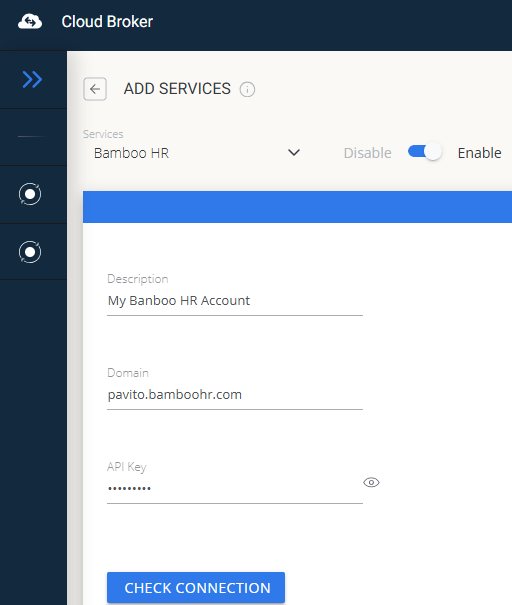
Step 5: Add credentials in OpenLM
- Open the OpenLM Cloud Broker dashboard.
- Locate the BambooHR integration.
- Enter the following values:
- BambooHR company domain
- API access token
Step 6: Verify and approve the connection
- Test the connection to confirm that OpenLM can retrieve data.
- Approve the new data source in the License Servers section.
Once approved, BambooHR usage data becomes available in the OpenLM Allocation service.