Google Analytics
Google Analytics Usage Monitoring
About Google Analytics
Google Analytics is a web analytics service that tracks and reports website traffic. It provides insights into user behavior, traffic sources, and conversion metrics. Monitoring Google Analytics usage is important for understanding which team members are actively using the platform for business intelligence and data analysis. This is similar to monitoring other analytics platforms like HubSpot or Salesforce.
Prerequisites
To begin monitoring Google Analytics, ensure you have the following components and permissions in place:
- OpenLM Components: OpenLM Cloud Broker and OpenLM SLM are required.
- Platform-specific Requirements: You'll need administrative access to your Google Analytics account to create a Service Account with the necessary API access and permissions.
Configuring data collection
Follow these step-by-step instructions to set up data collection for Google Analytics in OpenLM Cloud Broker:
-
Sign in to your Google Analytics account.
-
Click on Admin in the lower left corner.
-
In the Property column, select Data Streams.
-
Choose the relevant data stream for your website.
-
Look for the Measurement ID, which starts with "G-" followed by a series of letters and numbers. This is your Google tag ID.
-
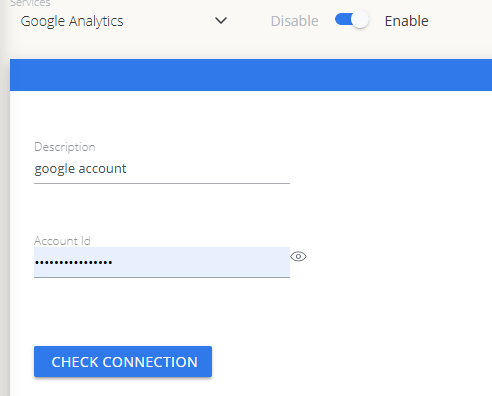
Add Credentials: In the OpenLM Cloud Broker dashboard, find the Google Analytics integration and type your Account ID.
-
Verify Connection: Test the connection to ensure that OpenLM can successfully retrieve data.
-
Approve in OpenLM: Approve the new data source within the License Servers section.
-
See Data: Usage data for Google Analytics will now be visible in the OpenLM Allocation service.
Viewing reports
Access your reports to analyze usage patterns.
- User Activity Trends: See which users are accessing Google Analytics and for how long.
- Expired/Unused License Reports: Identify and reclaim licenses from inactive users.