
License access control

From watching licenses to controlling them

Set who gets access, when, and how — across every engineering license manager you run. OpenLM License Access Control (LAC) moves you beyond visibility into active enforcement, so your most expensive engineering software licenses always go to the right people.

What it does

One control plane for all your engineering license policies

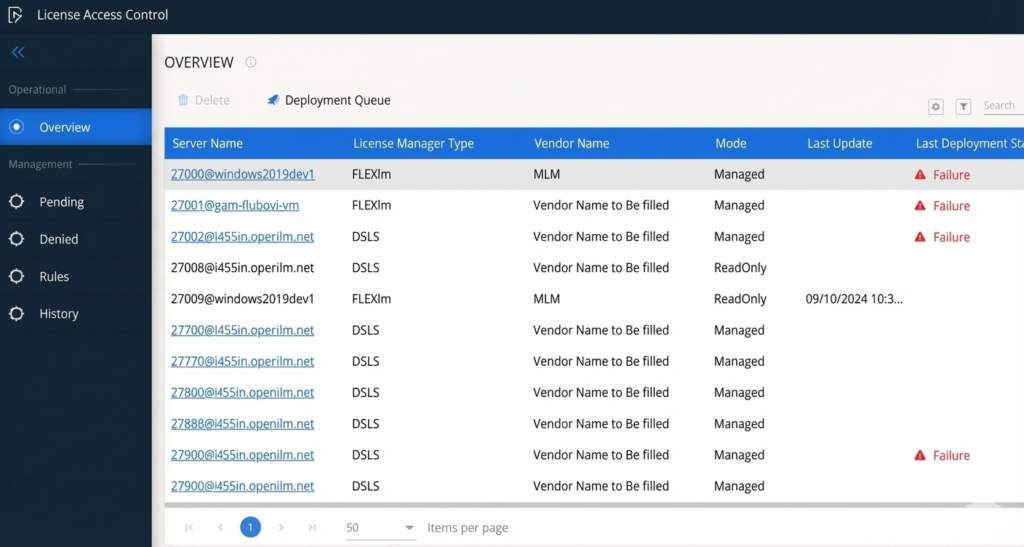
High-cost engineering tools, such as Autodesk, Bentley, Ansys, Esri, and more, sit behind complex, vendor-specific configuration files. Managing access across them used to mean learning each system’s syntax, editing files by hand, and hoping deployments stuck. LAC replaces all of that with a single, guided interface. Create rules, build policies, and deploy them on schedule — no specialist knowledge required.

Now, with active enforcement, LAC no longer just observes license usage; it blocks unauthorized consumption. SaaS license servers are now fully covered alongside on-premise servers, and bulk setup slashes onboarding time for large environments.

Core capabilities

Everything you need to run license access at scale

Simplified rule creation

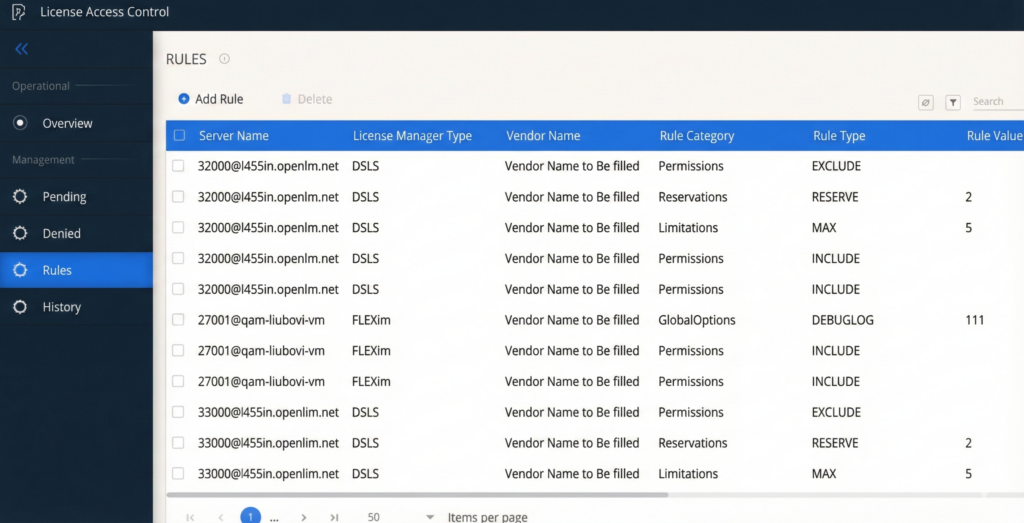
A guided wizard walks you through building access rules — include or exclude users, reserve seats, set usage limits. It also translates everything into the correct format for each license manager automatically.

Policy-based scheduling

Group rules into policies and schedule their deployment by time of day or day of week. Automatically shift access priorities across global teams and time zones without manual intervention.

Active enforcement

LAC checks the agent-installed status at deployment time and blocks users without a managed agent from the next deployments. Thus, it restores accurate consumption data and closes compliance gaps.

Bulk rule setup

Add hundreds of users, groups, or software features to a policy in one action. What used to take a full day for a large environment now takes minutes.

SaaS license server support

Deploy access policies to SaaS-hosted engineering license servers the same way you do for on-premise servers, through scheduled or manual deployment, with no gaps in coverage.

Complete audit trail

Every deployment, every rule change, and every skipped allocation is logged with a clear explanation. Administrators get full visibility into what ran, what was skipped, and why.

How it works

Set up in three steps

Build your rules

Use the allocation wizard to define who can access which engineering software features. Select users, groups, or entire departments — and add as many combinations as you need in a single action. No command-line syntax required.

Assemble a policy

Group your rules into a named policy. Schedule it to deploy at specific times — morning shifts, regional handoffs, project deadlines — or trigger it manually whenever you need an immediate change.

Deploy and enforce

OpenLM pushes your policy to every target license server — on-premise and SaaS. With enforcement turned on, the system automatically blocks allocations from users without a managed agent, and flags any issues in the deployment report.
Latest release

What's new in LAC

Active enforcement engine

LAC now actively blocks license consumption from users that aren't running the managed endpoint agent — rather than simply flagging the issue after the fact. Think of it as the difference between a security camera and a locked door. A brief agent disconnect doesn't affect legitimate users; only truly unmanaged users are blocked.
Bulk allocation creation

Select multiple users, groups, and software features at once, and OpenLM creates all the necessary rules in one shot. Onboarding a 200-group environment used to take the better part of a day. Now it's a matter of minutes.
SaaS license server deployment

You can now deploy access policies to SaaS-hosted engineering license servers, closing the last coverage gap between cloud and on-premise environments. Scheduled and manual deployment both work the same way regardless of server type.
Resilient deployment for managed directory changes

Deployments no longer fail when a referenced user or group has been disabled or removed from your directory. OpenLM skips the affected entry, logs a clear warning, and surfaces it in the deployment report — so the rest of your policies go through without interruption.


Compatibility

Built for engineering software, at depth

OpenLM supports more engineering license managers than any other solution — including
on-premise and SaaS-hosted servers from the vendors your teams rely on every day.

Engineering license managers supported
80 +
Highest engineering license coverage
# 1

Ready to take control of your licenses?

Start a free trial or talk to our team to see how LAC fits into your engineering environment.

Frequently Asked Questions (FAQs)

What is OpenLM License Access Control?
LAC is a centralized interface that lets you create, manage, and deploy license access policies across multiple engineering license managers — without writing vendor-specific syntax. It now also enforces those policies actively, blocking unauthorized license usage before it consumes your budget.
Monitoring tells you what happened after the fact. Enforcement prevents unauthorized access from happening in the first place. When enforcement is active, OpenLM detects workstations that are consuming licenses outside your managed environment and removes their allocation on the next deployment cycle — keeping your consumption data accurate and your spending controlled.

No. OpenLM distinguishes between a user with a temporarily offline agent and one that has no managed endpoint at all. A brief disconnect does not trigger enforcement — only users without a managed agent are blocked.

No. The LAC wizard handles translation automatically. You define your rules in plain language — include this group, reserve those seats, limit usage to this time window — and OpenLM writes the correct configuration for each engineering license manager behind the scenes.

Yes. As of the latest release, LAC fully supports policy deployment to SaaS-hosted engineering license servers — both on a schedule and on demand. Coverage is now consistent across on-premise and cloud-hosted license environments.