
OpenLM LicOps for HPC
Your HPC jobs wait on licenses. Now they follow your rules
OpenLM LicOps connects to your HPC job queue and checks each job against rules you set before it takes a machine. The rules decide whether the job starts, waits or is denied, and which license server it uses. LicOps records what happened and why.
Docker-based
component you install in
your own environment
OpenLM Platform
where you configure and
manage it
Since 2007
OpenLM has managed
engineering software licenses

OpenLM is trusted by engineering teams worldwide






















See how OpenLM LicOps works
Licenses are checked too late, or not at all
The extra jobs start anyway, and fail
Launch 110 jobs on 100 licenses and the extra 10 try to start regardless. They run into a license that isn’t there.
Someone has to choose the license server
With several license servers, each job needs to use the right one. That choice should be made per job, not left to configuration.
A failed license server stops the work
When the primary license server goes down, work that depends on it stops until someone points it at a backup.
What LicOps does about it
BEFORE THE JOB RUNS
Checks the license first
LicOps checks for a license before a job occupies any machine.
YOUR RULES
Applies the rules you set
Conditions, priority and actions decide whether a job starts, waits or is denied, and which license server it uses.
WHEN A SERVER FAILS
Switches to the backup
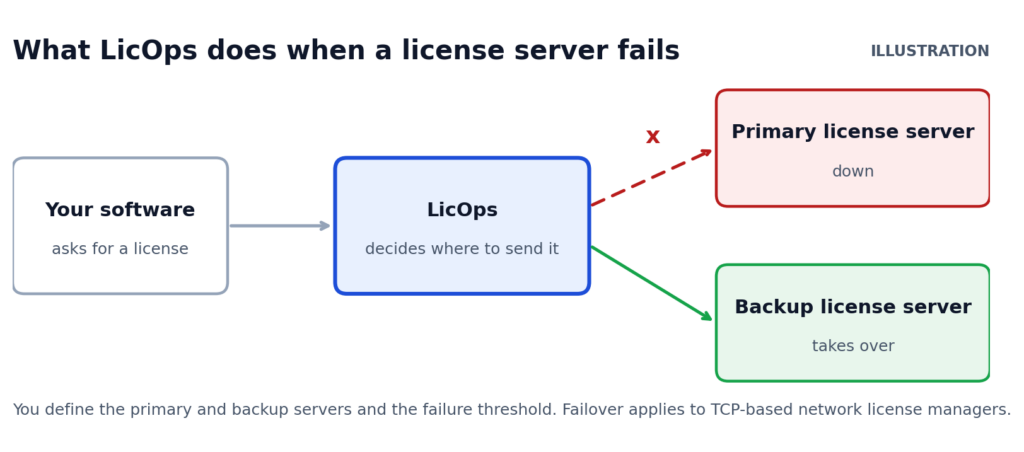
If the primary license server goes down, LicOps switches to the backup.
AFTER THE JOB
Logs what happened and why
LicOps records the details of every job and the reason behind them.
**OpenLM LicOps is built for HPC clusters and computational jobs.
Starts what fits. Queues the rest.
LicOps sits in your job queue. Before a job occupies any machine, it checks for the license the job needs.
Runs up to your license limit
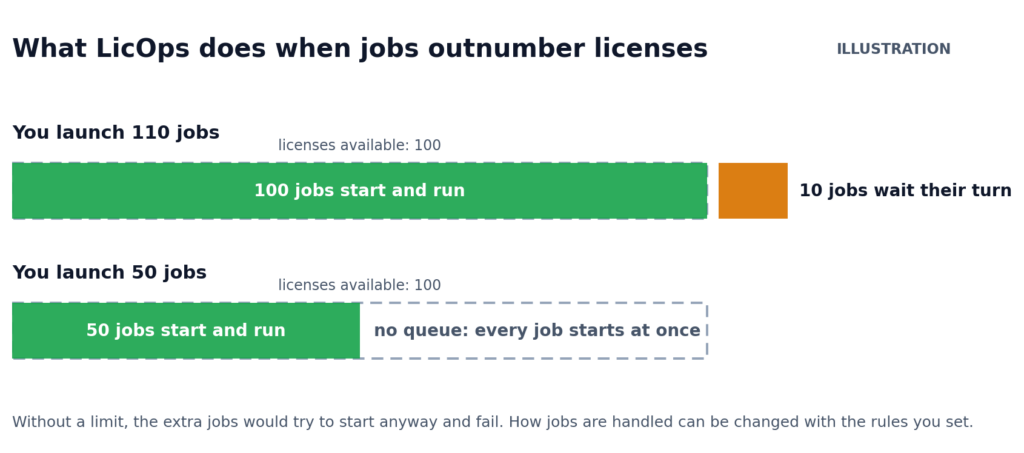
With 100 licenses, 100 jobs run at once.
The rest wait their turn
Launch 110 and the extra 10 queue instead of failing at start-up.
Nothing waits when there is room
Launch 50 on 100 licenses and every job starts at once. There is no queue.
You set the rules
Every rule has conditions and an action. You set both, and you can change them when your needs change.
Conditions
Match jobs on attributes such as the license vendor, and combine conditions into groups.
Actions
Send a job to a specific server, prefer a server, keep it off a server, cascade across servers in priority order, or deny the request.
Priority and dates
Give each rule a priority, switch it on or off, and set the dates it applies.
Switches to the backup when a license server fails
If the primary license server goes down, LicOps switches to the backup, so no one has to reconfigure anything by hand.
Primary and backup
You define a primary and a backup license server for each connection.
Failure threshold
You set the failure threshold that triggers the switch.
Failback mode
You choose how work returns to the primary once it recovers. The default is Auto. **Failover applies to TCP-based network license managers.
Every job leaves a record
LicOps logs the details of what happened to each job, and why it happened.
A record per job
What happened to each job, in one place.
The reason, not just the result
Each record says why, so you are not piecing it together from scheduler and license-server logs.
Installs in your environment. Managed from OpenLM Platform
LicOps is a Docker-based component that you run yourself, and you configure it from OpenLM Platform.
Docker-based
One component, installed by you. For on-prem deployments it can reuse OpenLM’s Kubernetes, where your network configuration allows.
Managed from OpenLM Platform
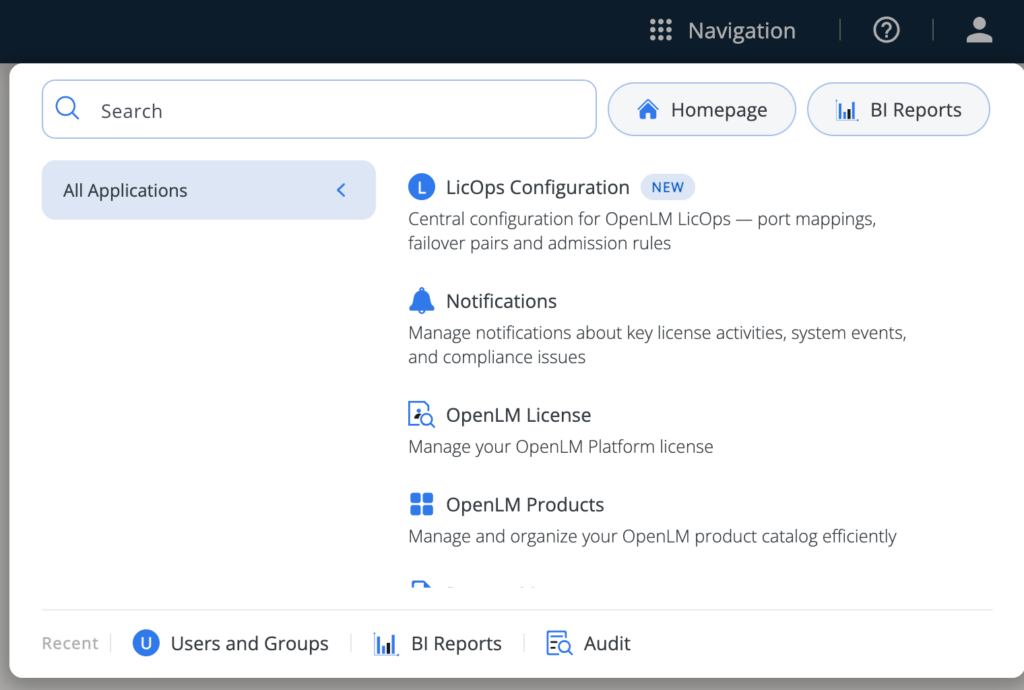
LicOps Configuration is a menu entry in Platform, where you set up connections, failover and rules.
What changes, by team
FAQ
What is OpenLM LicOps?
OpenLM LicOps is for HPC clusters and computational jobs. It integrates with the job queue and checks for a license before a job occupies any machines. It also determines which license server the job will use, switches to a backup server when the primary fails, and logs the details of what happened to each job and why.
What happens when I launch more jobs than I have licenses?
LicOps runs as many jobs as your licenses allow and queues the rest. For example, with 100 licenses and 110 jobs, 100 run and 10 wait their turn instead of trying to start and failing. With 100 licenses and 50 jobs, every job starts at once and there is no queue.
Can I change how jobs are handled?
Yes. Behavior is set by rules that you write. Each rule has conditions, such as the license vendor, a priority, the dates it applies, and an action: send to a specific server, prefer a server, keep off a server, cascade across servers in priority order, or deny the request.
What happens if a license server goes down?
LicOps switches to the backup server you defined, so no one has to reconfigure anything by hand. You set the failure threshold and the failback mode. Failover applies to TCP-based network license managers.
How is LicOps installed?
LicOps is a Docker-based component. You install it in your own environment, outside OpenLM Platform, and manage it from OpenLM Platform. For on-prem deployments it can reuse OpenLM’s Kubernetes, where your network configuration allows.
Do I need OpenLM Platform, and which functions do I get?
LicOps is configured and managed from OpenLM Platform. Which functions are active depends on your OpenLM license.
How is this different from my scheduler’s built-in license counters?
Built-in counters track what users declare. LicOps acts at the job queue, before the job takes machines.
How can I see it?
Request a demonstration with a solution expert. We show LicOps in a demonstration environment and walk through how it would fit your setup.
Stop finding out about license problems after the job starts
Request a demonstration and see LicOps apply your license rules before a job takes a machine.