Proactively monitor critical events in your license ecosystem
Introducing OpenLM Alerts
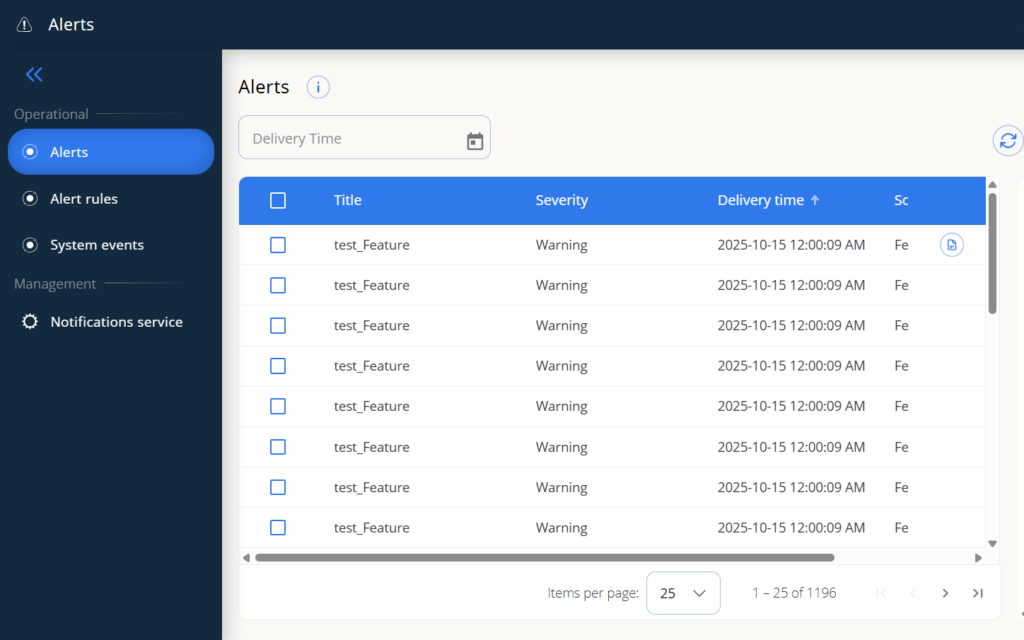
Proactively manage your license environment with OpenLM Alerts
OpenLM Alerts provides a unified solution that streamlines your license ecosystem monitoring. It’s designed to give you continuous visibility into your license servers, users, and software usage, ensuring you’re always one step ahead of potential issues.
Common types of alerts you can define with OpenLM | |
No default project | LM host down |
License server down | Synchronization failed |
Blocklisted device connected/disconnected | Non-blocklisted device disconnected |
Reporting error | License expiration |
License procurement expiration | User availability error |
Â
Key capabilities of OpenLM Alerts

Centralized alert management
Manage and monitor all alerts from a single, unified interface. This centralized view provides a comprehensive overview of your entire license ecosystem, making it easy to spot trends and address issues efficiently.
Customizable alert rules
Tailor alerts to your specific needs. Set up rules based on a wide range of criteria, including license server status, user activity, and software usage metrics. This flexibility ensures you're notified about the events that matter most to your organization.
Real-time notifications and actions
Get real-time alerts for critical events like a license server going down or a synchronization failure. OpenLM Alerts can initiate actions automatically, such as sending an email notification, creating a ticket in your ticketing system, or integrating with other business applications to streamline issue resolution.
Granular control
Define exactly who receives notifications and for which events. This granular control ensures the right people are always informed, without unnecessary communication.

Types of alerts you can configure
- License server downtime: Get immediate alerts if a license server becomes unavailable, preventing potential user downtime.
- Failed synchronization: Be notified when synchronization with a license manager fails, ensuring data accuracy.
- User and license errors: Receive alerts for user-related issues (e.g., user blacklisted) or license-related problems (e.g., license expiration).
- In-use License Alerts: Monitor specific license usage to ensure compliance and prevent over-utilization.
Benefits of adopting a proactive alert strategy
- Prevent software downtime: By monitoring critical system events, OpenLM Alerts helps you prevent disruptions and ensures your software is always available.
- Enhance issue resolution: Streamline your workflow by integrating alerts directly with your existing ticketing or IT management systems. This reduces the time it takes to identify and resolve issues.
- Ensure peace of mind: With continuous monitoring and real-time alerts, you can be confident that your license environment is healthy and performing optimally.
Curious for a demo?
Check out how OpenLM Alerts and other features function in a detailed demo of the OpenLM Platform.
Frequently Asked Questions
How does OpenLM Alerts enable a proactive license management strategy?
Can I customize my alert rules and integrate them with my existing IT systems?
Yes. You can tailor alerts to your organization’s specific needs by setting rules based on a wide range of criteria, including license server status, user activity, and software usage metrics. OpenLM Alerts enhances issue resolution by initiating automatic actions, such as creating a ticket directly in your existing ticketing or IT management systems, and sending a real-time notification to the correct team.
What types of critical license events can OpenLM Alerts monitor?
We provide comprehensive coverage for your entire license ecosystem, which includes support for 140+ license managers. You can configure granular alerts to monitor the events that matter most, including:
- License server downtime: Get immediate alerts if a critical server becomes unavailable.
- Failed synchronizations: Be notified to ensure data accuracy.
- User and license errors: Receive alerts for license expirations, user-related issues (e.g., user blocklisted), or potential compliance breaches.
- In-use license alerts: Track specific license usage to ensure you prevent over-utilization.